
Legal Compliance aka C.Y.A.
Be audit-ready on handbook compliance (SOC 2 or otherwise).
If audits, litigation, discovery, or questions from the boss are part of your life, Blissbook has your back. Fast, simple reporting shows auditors, lawyers, and leadership how effective and professional your governance is.
Sounds good?Request a Demo
Companies large and small trust Blissbook.


Ready when they ask
Every signature and policy change stays on record.
Blissbook keeps your handbook compliance records in one place: who was notified, who viewed, and who signed each handbook and policy, plus the exact content each person saw. Every policy's history sits right beside it, from each version to each review and approval. When an auditor, a lawyer, or your boss asks, you pull the answer in minutes.
Measurable impact
Fewer admin hours. Compliance goals: met.
Signatures Collected
Employee handbook (and related) signatures collected.
Signed in 90 Days
If 2 or more reminders are sent to signers at any time.
Audit Readiness
Time-stamped signature records tied to the exact policies viewed.
Side by side
Every answer comes from one record.
Each question an auditor usually asks has one place to look in Blissbook.


How Blissbook keeps your handbook compliance records.
Electronic signatures
Know who has signed, viewed, or been notified.
Request and collect legally binding electronic signatures, as many as you'd like, whenever you'd like, from every employee. The Reporting Center shows who's been notified, who's viewed, and who's signed each handbook and policy, by employee, by document, or by manager. Watching the signed column fill in on its own sure beats updating a spreadsheet row by row.
Slice and dice
Sort compliance by any employee data you sync.
The report leadership asks for every quarter is already saved and waiting. Filter by location, job title, department, or any other synced field, plus dates like last signed or hire date, then save the view for yourself or the whole team and export it to CSV. When you bring managers in, they see their own team's status too (and stop emailing you for it).
Your digital file cabinet
Print exactly what each employee signed.
Any employee's exact handbook, or just the single policy they signed off on, is ready to print. One PDF holds all their documentation: signatures, views, and emails. Personalized content means each person only sees and signs what applies to them, and their history stays on file after they leave, so a request about a former employee gets the same clean answer.
Version control
See exactly how each policy got here.
Each policy's version history tells you exactly what content changed, who published the new content, and when it was published. Compare any two published versions side by side, with deletions in red and additions in green, and see who made every edit along the way, suggested edits included. When legal asks why one sentence changed two years ago, you'll know.
Be ready for discovery
Hand legal a policy's full history in one PDF.
Quickly access past versions, approval history, and distribution records so legal teams can get what they need fast. A Data Lineage Report pulls that history together for one policy or a whole batch from your policy library. Pick the timeframe and which versions to include, then add release notes, reviewer feedback, and annotations as the request calls for them.
Get approvals on record
Every review round stays with the policy.
Use built-in workflows to route updates for review and approval, creating a clear audit trail from draft to final. Each round records who reviewed, who approved or asked for changes, the feedback they left, and the due date. Give legal edit access, or let them comment and suggest changes with full visibility, and their input lands in the same history.
Plays well with others
Your records, in the systems you already use.
Every employee's latest signed acknowledgement downloads as one ZIP file, or signed PDFs land on your SFTP server automatically. Through the Blissbook API, your IT team pulls signature records, saved reports, and the activity log into dashboards, archives, or security tools. AI tools like Claude or ChatGPT connect through our MCP server and read the same view, signature, and notification activity.
Auditors check us too
Your compliance records stay protected and yours.
Your IT and security teams get the answers they ask every vendor for on the IT and security page:
- SOC 2 audits completed
- Data encrypted in transit with TLS 1.2+
- Single sign-on with Okta, Azure, Google, Rippling, and SAML
- Employee sync with 80+ HRIS, AD, and payroll platforms
- Backups and recovery handled for you
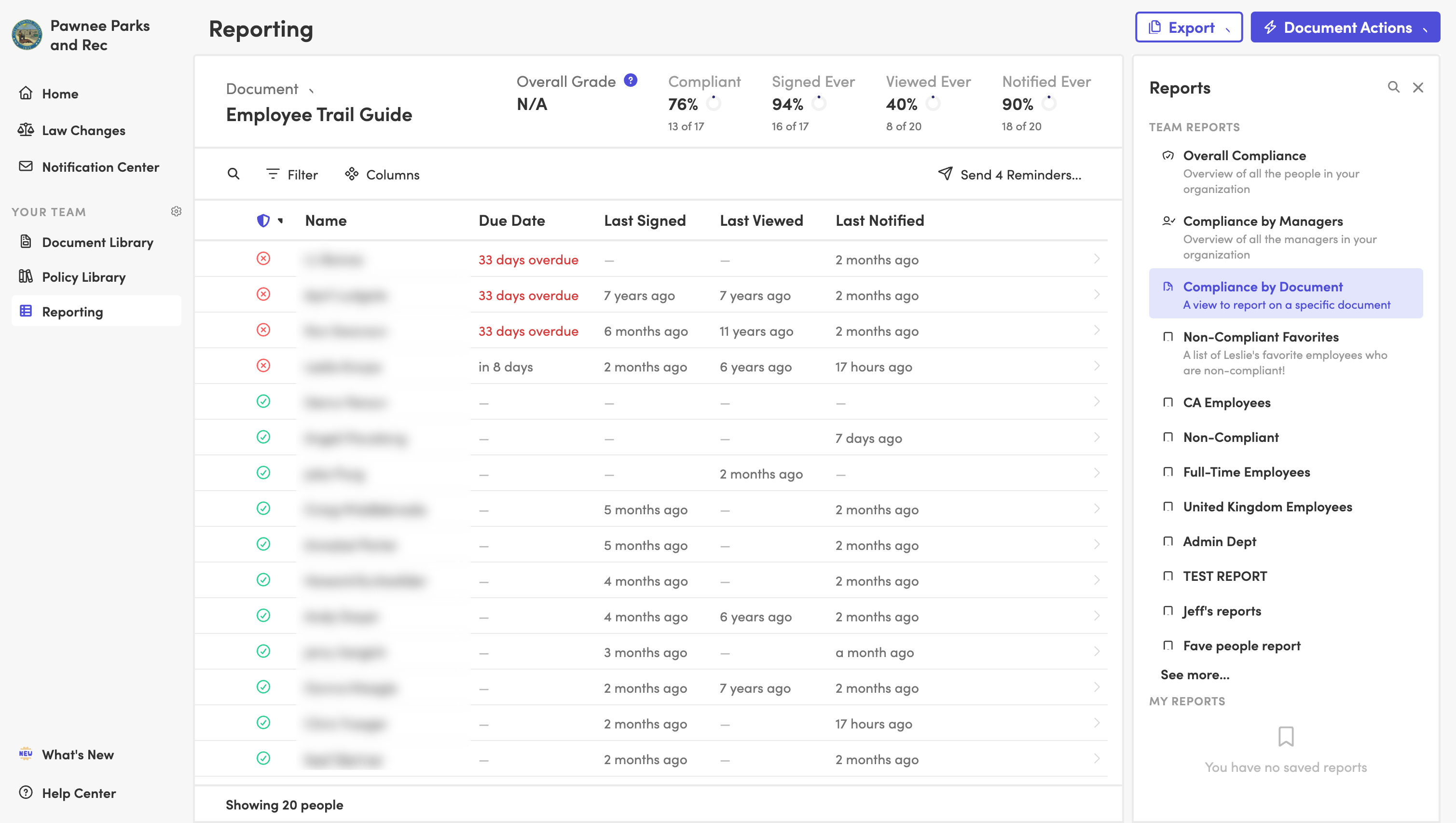
Electronic signatures
Know who has signed, viewed, or been notified.
Request and collect legally binding electronic signatures, as many as you'd like, whenever you'd like, from every employee. The Reporting Center shows who's been notified, who's viewed, and who's signed each handbook and policy, by employee, by document, or by manager. Watching the signed column fill in on its own sure beats updating a spreadsheet row by row.
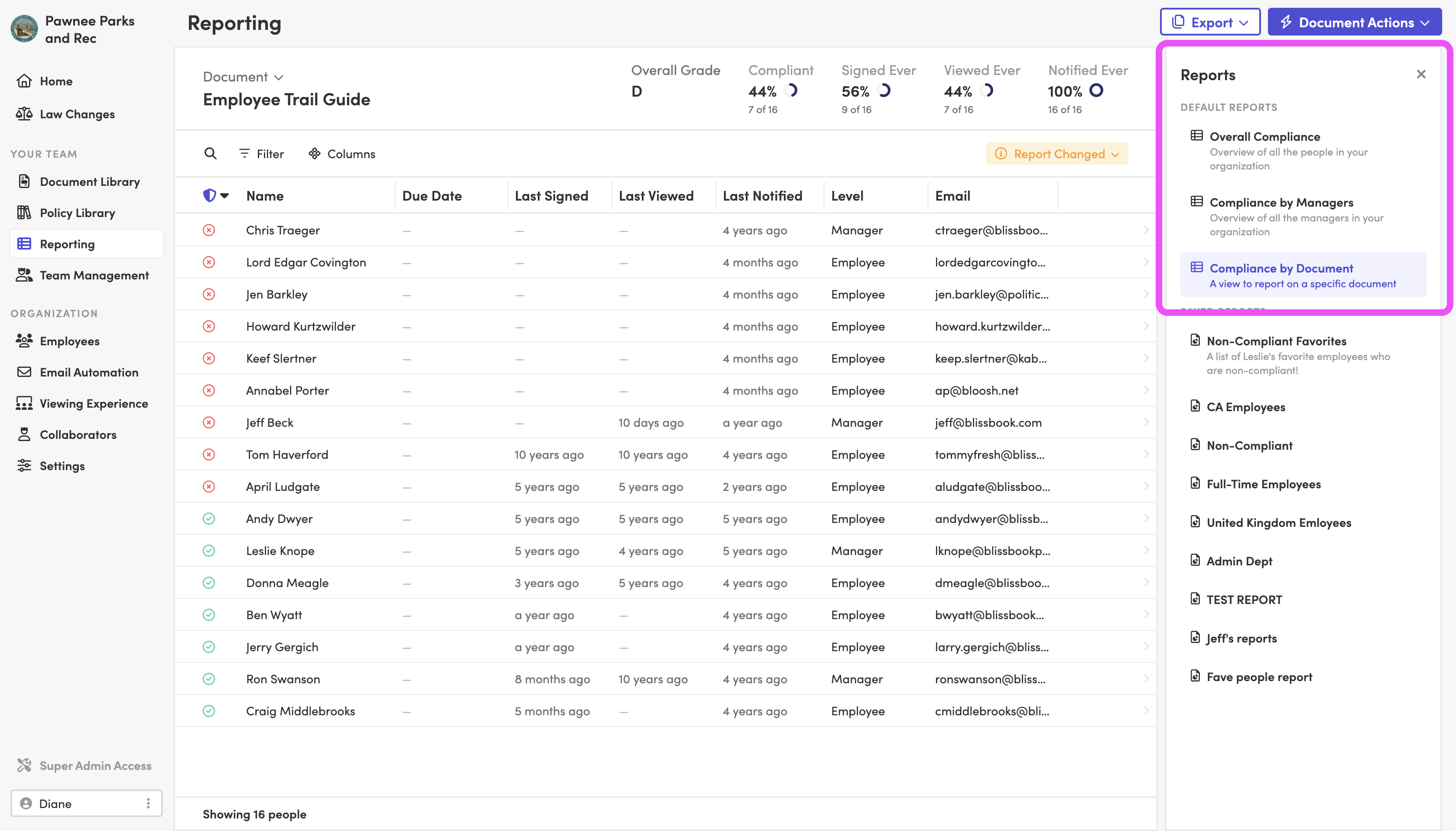
Slice and dice
Sort compliance by any employee data you sync.
The report leadership asks for every quarter is already saved and waiting. Filter by location, job title, department, or any other synced field, plus dates like last signed or hire date, then save the view for yourself or the whole team and export it to CSV. When you bring managers in, they see their own team's status too (and stop emailing you for it).

Your digital file cabinet
Print exactly what each employee signed.
Any employee's exact handbook, or just the single policy they signed off on, is ready to print. One PDF holds all their documentation: signatures, views, and emails. Personalized content means each person only sees and signs what applies to them, and their history stays on file after they leave, so a request about a former employee gets the same clean answer.

Version control
See exactly how each policy got here.
Each policy's version history tells you exactly what content changed, who published the new content, and when it was published. Compare any two published versions side by side, with deletions in red and additions in green, and see who made every edit along the way, suggested edits included. When legal asks why one sentence changed two years ago, you'll know.
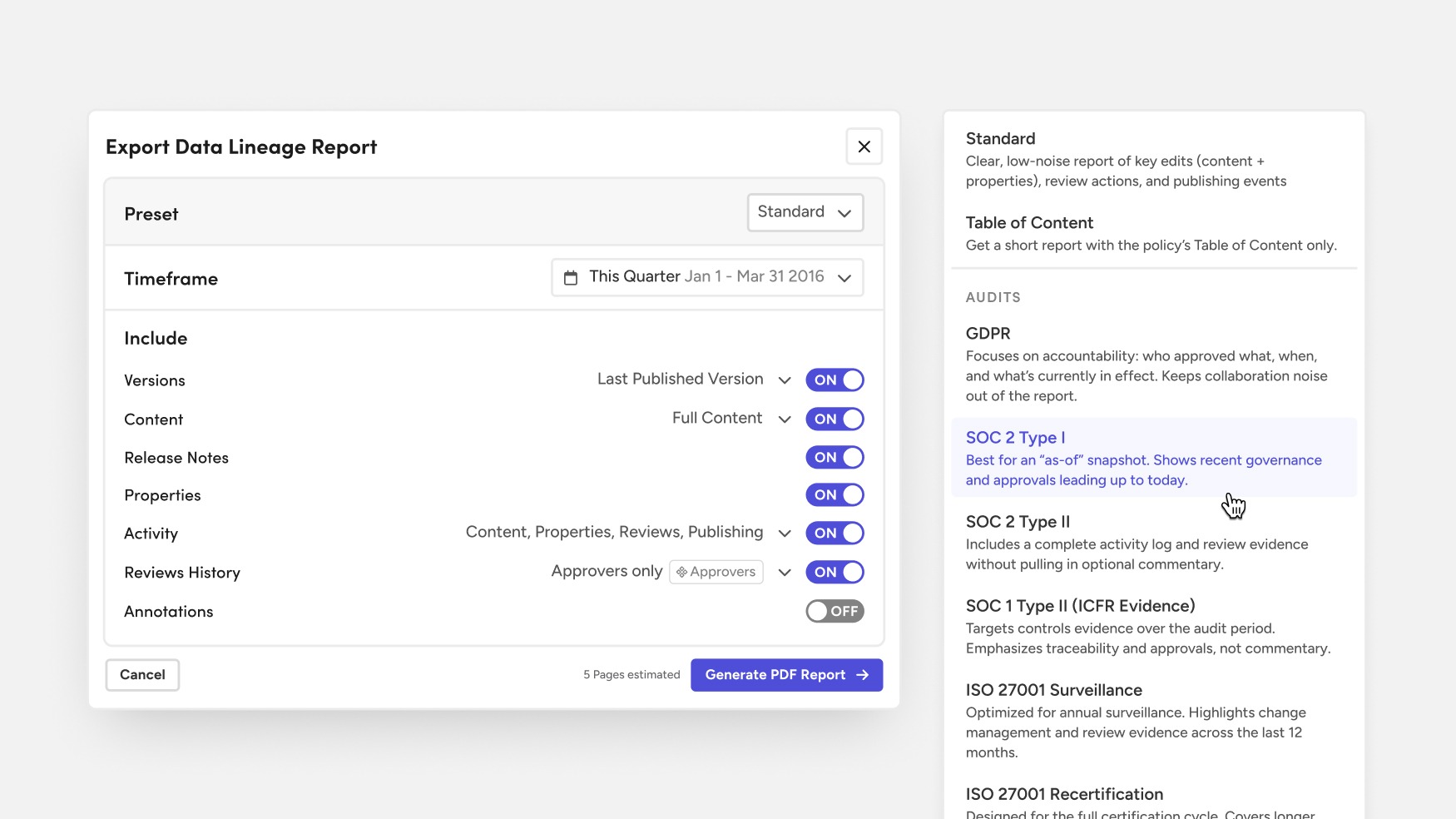
Be ready for discovery
Hand legal a policy's full history in one PDF.
Quickly access past versions, approval history, and distribution records so legal teams can get what they need fast. A Data Lineage Report pulls that history together for one policy or a whole batch from your policy library. Pick the timeframe and which versions to include, then add release notes, reviewer feedback, and annotations as the request calls for them.
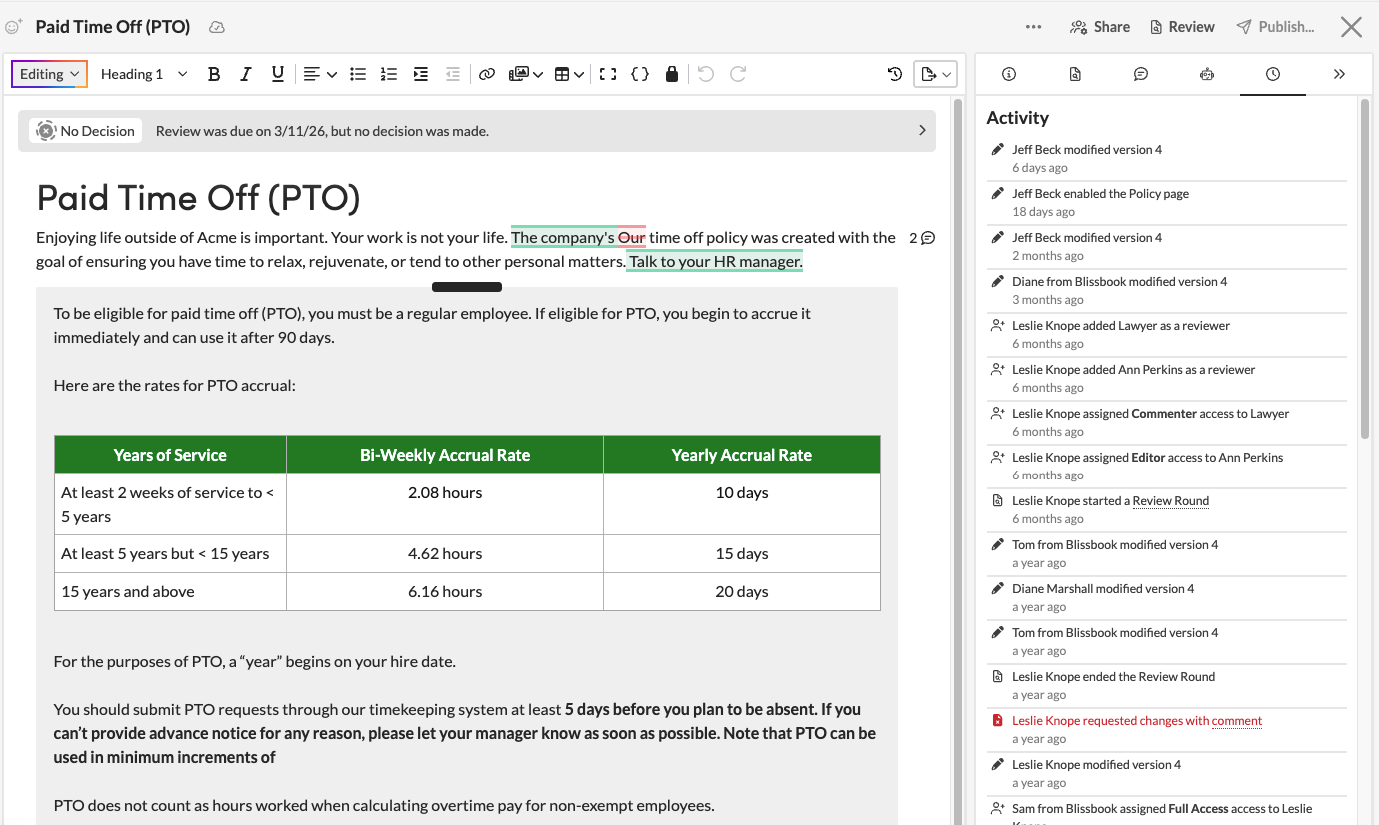
Get approvals on record
Every review round stays with the policy.
Use built-in workflows to route updates for review and approval, creating a clear audit trail from draft to final. Each round records who reviewed, who approved or asked for changes, the feedback they left, and the due date. Give legal edit access, or let them comment and suggest changes with full visibility, and their input lands in the same history.
Plays well with others
Your records, in the systems you already use.
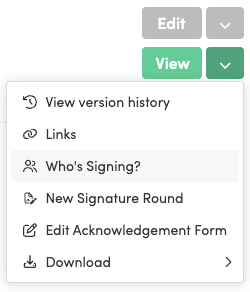
Every employee's latest signed acknowledgement downloads as one ZIP file, or signed PDFs land on your SFTP server automatically. Through the Blissbook API, your IT team pulls signature records, saved reports, and the activity log into dashboards, archives, or security tools. AI tools like Claude or ChatGPT connect through our MCP server and read the same view, signature, and notification activity.

Auditors check us too
Your compliance records stay protected and yours.
Your IT and security teams get the answers they ask every vendor for on the IT and security page:
- SOC 2 audits completed
- Data encrypted in transit with TLS 1.2+
- Single sign-on with Okta, Azure, Google, Rippling, and SAML
- Employee sync with 80+ HRIS, AD, and payroll platforms
- Backups and recovery handled for you
Blissbook has transformed how we manage and communicate our employee handbook and mandatory acknowledgments... we've surpassed our Handbook Campaign goals in both timeliness and completion rates.
 Jill Wolfe, HR Compliance, Shutterfly
The process to collect and audit employee signatures (now electronically!) has never been easier. A major improvement and advancement for employee handbooks!
 Amy Turner, HR Operations, Cengage
We love how easy it is to update content, communicate changes with employees, and report on acknowledgements. We couldn't be happier!
 Mystel Duke, SVP HR, SWBC
Blissbook has been an outstanding partner that helped us turn 150+ handbooks into 1 - our first electronic handbook.
 Kris Cegielski, HR Business Partner, Ashley Furniture
We love how easy it is to update our Team Member Handbook and the annotations feature really simplifies communicating changes with employees.
 Concetta Lewis, People Development, Daxko
We're so glad we decided to work with Blissbook when we replaced our PDF handbook. Yes, the product is great. More importantly, when we need help, they make us feel like we're their only customer.
 Keesha-Ann Murphy, Human Capital Generalist, Russell Reynolds Associates
The result of this hard work is a beautiful global handbook we are so proud of and that is very Slalom.
 Mel Murphy, Policy & Compliance Program Manager, Slalom
Everything you need for handbook compliance reporting
- Electronic signatures on every handbook
- Signed, viewed, and notified status
- Reports by employee, document, or manager
- Filters on any synced employee field
- Saved reports for you or your team
- CSV exports of any report
- One-PDF records for each employee
- Bulk downloads of signed acknowledgements
- Side-by-side policy version comparisons
- Review and approval history
- Data Lineage Reports with audit presets
- API and MCP server access
Frequently
Asked
Questions.
Ready for smooth sailing on your audits?
Getting started
What happens after you request a demo
- 1
A customized walkthrough
We schedule a call and cover what you care about, from the first signature round to the report at the end.
- 2
Easy to use from day one
Blissbook is straightforward to run, so your team gets going quickly without a heavy learning curve.
- 3
Customer success by your side
We'll help with setup, content migration, and design, so your first signature round works like a charm.