
Access, granted
Role-based policy access control that keeps you in charge
In Blissbook, you're always in control. Get what you need from collaborators without giving back-seat drivers the wheel (your security team will be happy, too).
Sounds good?Request a Demo
Companies large and small trust Blissbook.


Everyone in their lane
Tailored access for every role.
With Blissbook's role-based policy access control, you decide who can view, comment on, edit or publish each policy. Legal leaves comments, finance edits their own policies, and HR publishes. Team and organization roles cover the rest, so IT runs sign-in and integrations without touching policy content.
Measurable impact
Fewer admin hours. Compliance goals: met.
Signatures Collected
Employee handbook (and related) signatures collected.
Signed in 90 Days
If 2 or more reminders are sent to signers at any time.
Audit Readiness
Time-stamped signature records tied to the exact policies viewed.
Side by side
Policy work stays in the right hands.
Each row shows who can touch a common policy task today, and who touches it in Blissbook.


How Blissbook controls who can view, edit and publish.
Right people, right policy
Share each policy with exactly who needs it.
Every policy in your Policy Library has its own guest list, and you set how far each person can go, from view-only to full control. Finance keeps working on the expense policy while IT updates the acceptable use policy, and neither team wanders into the other's drafts (good fences, good neighbors). Each department owns its corner of the handbook.
Keep HR in charge
Bring in editors while you keep the publish button.
Editing and publishing are separate permissions in Blissbook. Your benefits manager rewrites the PTO policy and a teammate tidies the wording, while only the people you trust with publishing decide when the change reaches employees. You get the extra hands and keep the final word on what goes live.
Legal gets a say
Legal and leadership weigh in right on the draft.
Commenter access lets your attorney or CFO highlight a sentence, leave a comment or suggest an edit while the policy itself stays as it is. Their suggestions wait for you to accept or reject, and an @mention pulls the right person into a thread. Outside counsel joins the same policy too, so every note lands in one place.
Look, don't touch
HR partners check signatures without editing a word.
A reporting-only role opens the Reporting page to your HR business partners and employee relations team. They see who's viewed and signed each handbook and open the version an employee had access to, while every policy stays out of their editing reach. When a manager asks whether someone signed, your HRBP answers on the spot.
IT will approve
IT runs sign-in and employee sync without touching your policies.
Organization roles split up the admin work. The Tech role covers single sign-on, custom domains and your HRIS sync, Billing sees the subscription, and Branding handles logos and colors across your handbook and emails. Each person looks after their own piece, and your policy content stays with the people writing it.
Strictly need-to-know
Keep a sensitive policy with a small group until it's ready.
Turn off team-wide access on a single policy, and only the collaborators you name can open it. An executive travel policy or a reorganization plan stays with leadership and HR while the wording settles. When the policy is ready, widen access or publish it to employees on your own schedule.
Fewer oops moments
Narrower access means fewer surprise edits.
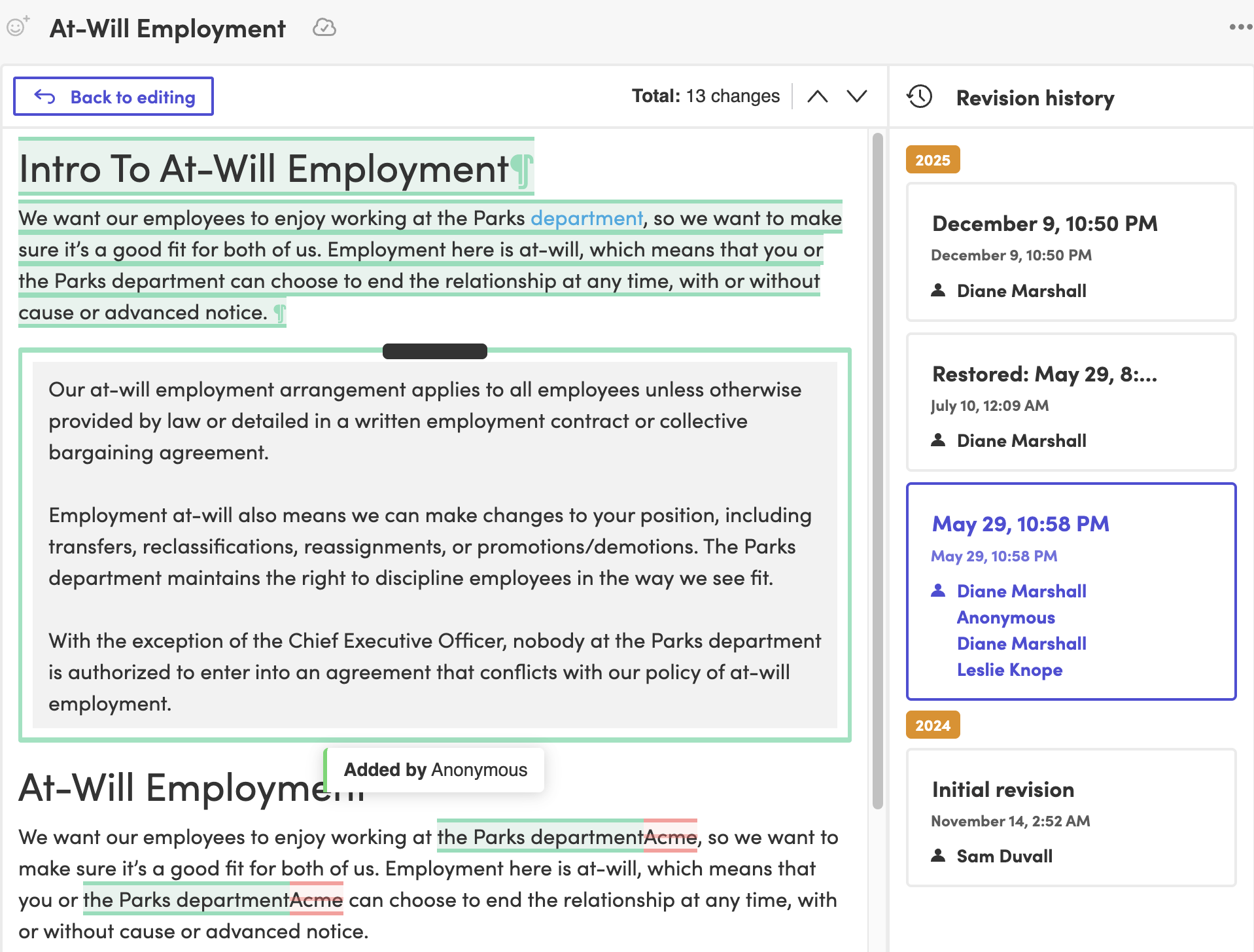
When each person holds only the access their work needs, a stray keystroke can't rewrite a policy they were only meant to read. Live cursors show who else is editing, and every action on a policy stays on record. If something does change, you see who changed it and when.
Built for security reviews
Your security team gets the answers it asks every vendor for.
Access control works alongside the rest of Blissbook's information security practices:
- SOC 2 audited
- Data encrypted in transit with TLS 1.2+
- Single sign-on with Okta, Azure, Google, Rippling and SAML
- Password-free email sign-in when you don't use SSO
- Backups and recovery handled for you
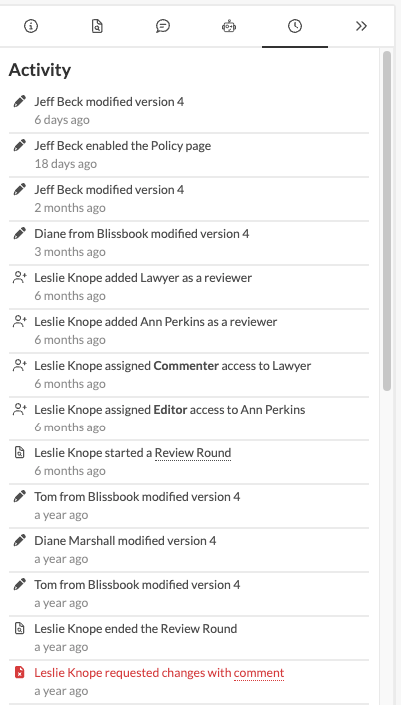
Right people, right policy
Share each policy with exactly who needs it.
Every policy in your Policy Library has its own guest list, and you set how far each person can go, from view-only to full control. Finance keeps working on the expense policy while IT updates the acceptable use policy, and neither team wanders into the other's drafts (good fences, good neighbors). Each department owns its corner of the handbook.
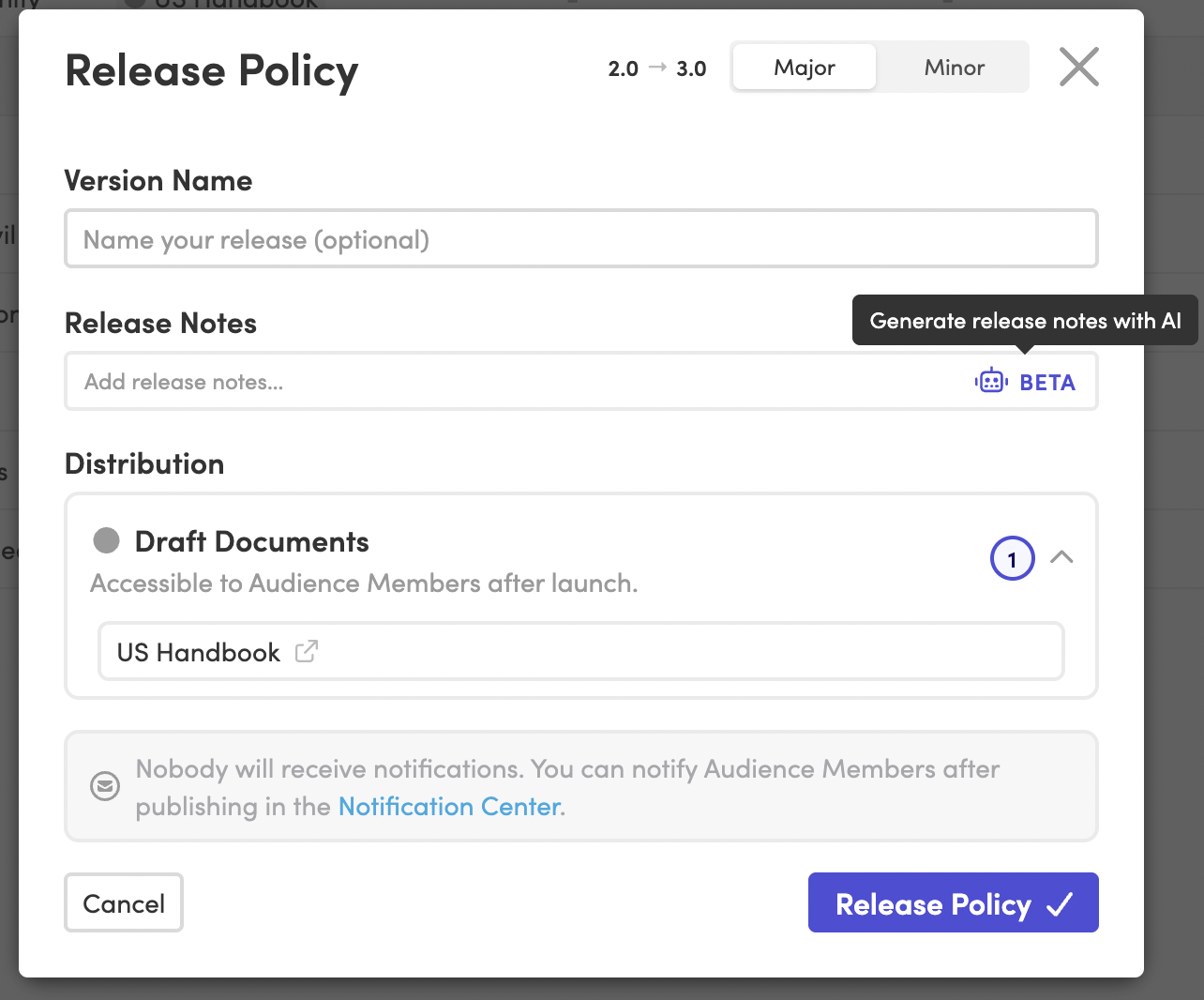
Keep HR in charge
Bring in editors while you keep the publish button.
Editing and publishing are separate permissions in Blissbook. Your benefits manager rewrites the PTO policy and a teammate tidies the wording, while only the people you trust with publishing decide when the change reaches employees. You get the extra hands and keep the final word on what goes live.
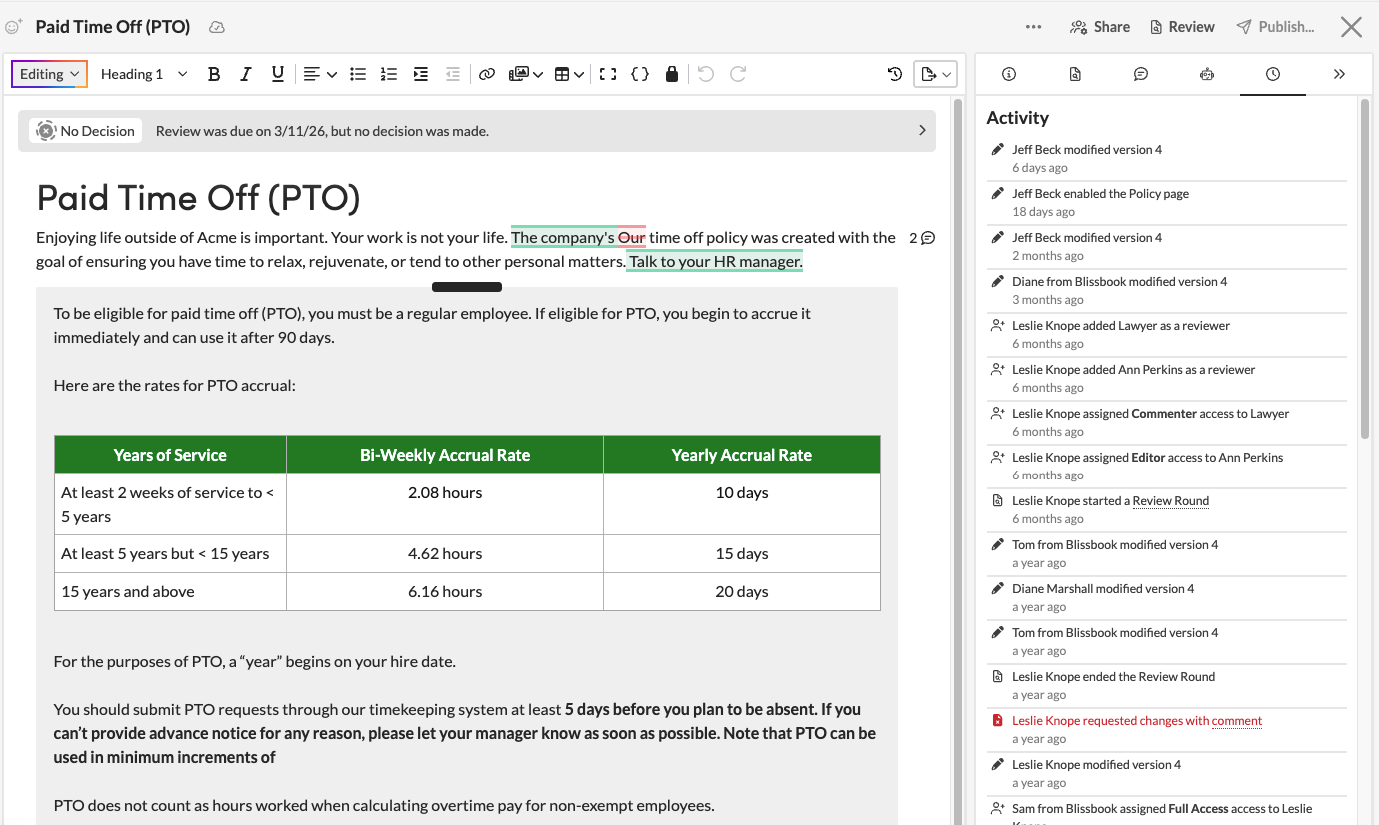
Legal gets a say
Legal and leadership weigh in right on the draft.
Commenter access lets your attorney or CFO highlight a sentence, leave a comment or suggest an edit while the policy itself stays as it is. Their suggestions wait for you to accept or reject, and an @mention pulls the right person into a thread. Outside counsel joins the same policy too, so every note lands in one place.
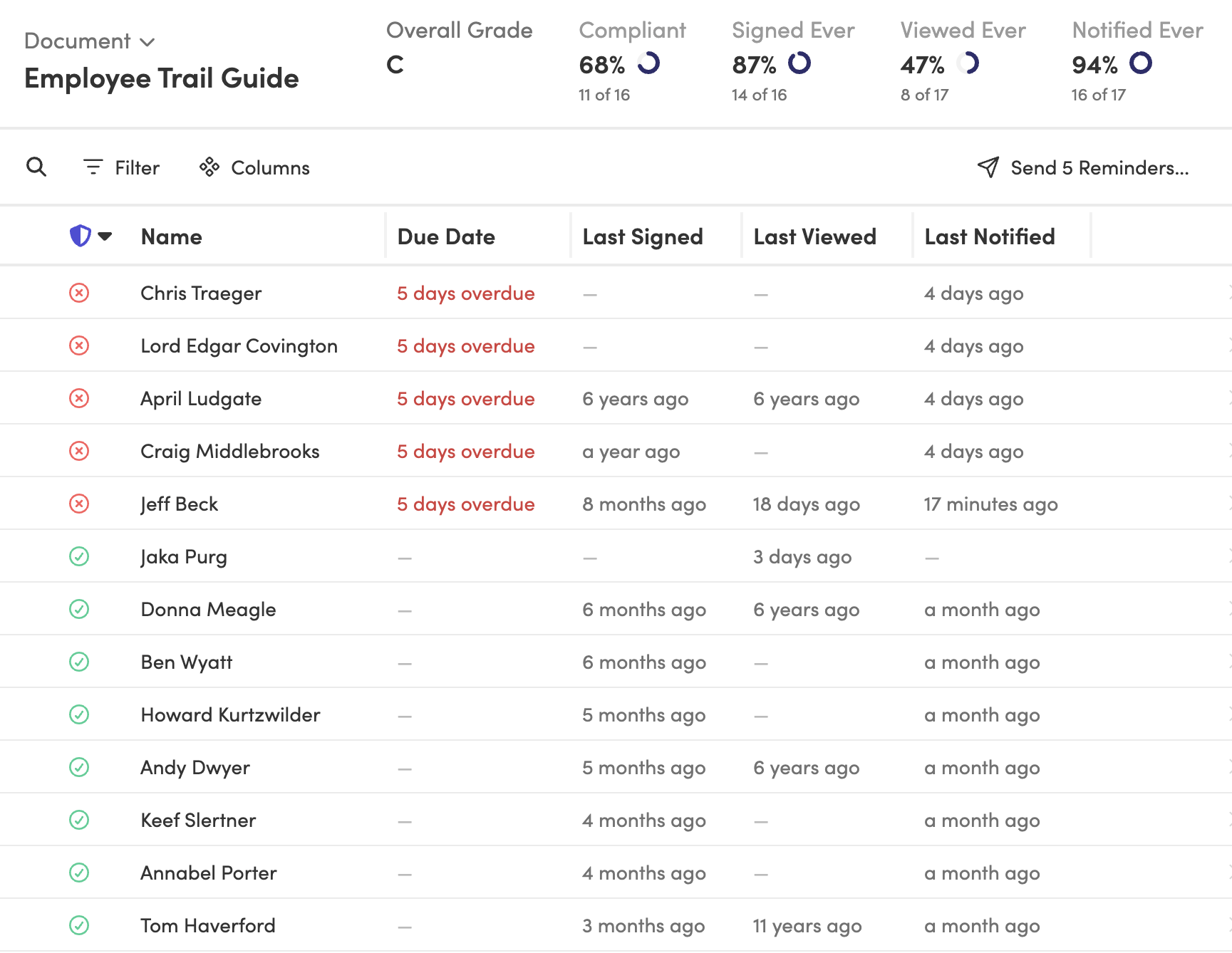
Look, don't touch
HR partners check signatures without editing a word.
A reporting-only role opens the Reporting page to your HR business partners and employee relations team. They see who's viewed and signed each handbook and open the version an employee had access to, while every policy stays out of their editing reach. When a manager asks whether someone signed, your HRBP answers on the spot.
IT will approve
IT runs sign-in and employee sync without touching your policies.
Organization roles split up the admin work. The Tech role covers single sign-on, custom domains and your HRIS sync, Billing sees the subscription, and Branding handles logos and colors across your handbook and emails. Each person looks after their own piece, and your policy content stays with the people writing it.

Strictly need-to-know
Keep a sensitive policy with a small group until it's ready.
Turn off team-wide access on a single policy, and only the collaborators you name can open it. An executive travel policy or a reorganization plan stays with leadership and HR while the wording settles. When the policy is ready, widen access or publish it to employees on your own schedule.
Fewer oops moments
Narrower access means fewer surprise edits.
When each person holds only the access their work needs, a stray keystroke can't rewrite a policy they were only meant to read. Live cursors show who else is editing, and every action on a policy stays on record. If something does change, you see who changed it and when.

Built for security reviews
Your security team gets the answers it asks every vendor for.
Access control works alongside the rest of Blissbook's information security practices:
- SOC 2 audited
- Data encrypted in transit with TLS 1.2+
- Single sign-on with Okta, Azure, Google, Rippling and SAML
- Password-free email sign-in when you don't use SSO
- Backups and recovery handled for you
Blissbook has transformed how we manage and communicate our employee handbook and mandatory acknowledgments... we've surpassed our Handbook Campaign goals in both timeliness and completion rates.
 Jill Wolfe, HR Compliance, Shutterfly
The process to collect and audit employee signatures (now electronically!) has never been easier. A major improvement and advancement for employee handbooks!
 Amy Turner, HR Operations, Cengage
We love how easy it is to update content, communicate changes with employees, and report on acknowledgements. We couldn't be happier!
 Mystel Duke, SVP HR, SWBC
Blissbook has been an outstanding partner that helped us turn 150+ handbooks into 1 - our first electronic handbook.
 Kris Cegielski, HR Business Partner, Ashley Furniture
We love how easy it is to update our Team Member Handbook and the annotations feature really simplifies communicating changes with employees.
 Concetta Lewis, People Development, Daxko
We're so glad we decided to work with Blissbook when we replaced our PDF handbook. Yes, the product is great. More importantly, when we need help, they make us feel like we're their only customer.
 Keesha-Ann Murphy, Human Capital Generalist, Russell Reynolds Associates
The result of this hard work is a beautiful global handbook we are so proud of and that is very Slalom.
 Mel Murphy, Policy & Compliance Program Manager, Slalom
Everything you need for policy access control
- Five access levels on every policy
- Sharing many policies at once
- Collaborators outside your company
- Team-wide access turned off per policy
- Separate editing and publishing rights
- Comments and suggested edits
- @mentions in comment threads
- Team roles from owner to viewer
- Reporting-only role for HR partners
- Organization roles for IT, billing and branding
- Live co-editing with teammates
- Audit history on every policy
Frequently
Asked
Questions.
Ready to keep policy access in the right hands?
Getting started
What happens after you request a demo
- 1
A customized walkthrough
We schedule a call and cover what you care about, from the first signature round to the report at the end.
- 2
Easy to use from day one
Blissbook is straightforward to run, so your team gets going quickly without a heavy learning curve.
- 3
Customer success by your side
We'll help with setup, content migration, and design, so your first signature round works like a charm.