
Party of more than one
Every employee finds answers to their policy questions in Blissbook.
Questions about which rules apply slow to a trickle, signatures come in on time, and your HR team keeps one handbook current together, wherever your people work.
Sounds good?Request a Demo
Companies large and small trust Blissbook.


Where you are now
Is managing your policies now a team effort?
As more locations, roles, and other differentiators stack up, tailoring your handbook and policies to each group is more efficient than fitting everyone into a one-size-fits-all version. Blissbook is where your team builds a personalized handbook, keeps it current and gets it signed.
Measurable impact
Fewer admin hours. Compliance goals: met.
Signatures Collected
Employee handbook (and related) signatures collected.
Signed in 90 Days
If 2 or more reminders are sent to signers at any time.
Audit Readiness
Time-stamped signature records tied to the exact policies viewed.
Side by side
Every part of the handbook job, shared by your team.
Each row is a part of the job your team runs from one place in Blissbook.


How Blissbook runs the handbook as a team.
Right policy, right person
Every employee finds the answer for their role and location.
Limit any section, policy, or paragraph to a group or HRIS field such as role, department, or location, and each employee sees only what applies to them. One personalized handbook covers everyone. Preview it as any employee before you publish, so the field crew reads field rules and nobody outside California has to suffer through the California supplement.
Many hands, one handbook
Your HR team works on the handbook together.
Co-edit in real time, comment with @mentions, and suggest edits that never overwrite a teammate's draft. Policy statuses are visible, and change history lets you see who changed what and when, with a redline of any two published versions. A new HR teammate can open any policy and read the comments and decisions behind it.
Everything in its place
Every handbook and policy lives where employees can find it.
Run your main handbook, a manager guide, and standalone policies side by side, each with its own audience and link. Employees view every handbook and policy that applies to them on one dashboard, search across all of it, and always see the latest published version. A "Signature Required" badge shows them exactly what's waiting on them.
Previously on your handbook
Employees see exactly what changed in each update.
Update your employee handbook whenever something changes, and employees see what's new since they last looked, marked with annotations. Send change notification emails with links straight to the updated pages, or make small fixes with no notice at all. Your team decides how loud each change should be.
Get to 100%
Your signature process keeps moving after launch.
Automated reminders go to employees who still need to sign, on the schedule you set, with copies to their managers. New signature rounds can reach everyone or a specific group with a due date, and the Reporting Center shows who's signed, viewed, or not opened it yet. When leadership asks for signature status, you already have the report.
Less busywork
Your employee list stays current while you stay in charge.
A daily sync with more than 80 HRIS, payroll and directory platforms adds new hires, updates details, and removes people who leave. New employees automatically get their invitation, and everyone signs in through your company's single sign-on or a link emailed to them. The same sync feeds the role and location details behind personalized content.
First impressions count
Your handbook looks as polished as the company behind it.
A branded online handbook uses your logo, fonts and colors, with a layout that works on phones, so employees on the warehouse floor read it as easily as the ones at a desk. Your handbook looks polished from day one, even when HR has six other things open.

Right policy, right person
Every employee finds the answer for their role and location.
Limit any section, policy, or paragraph to a group or HRIS field such as role, department, or location, and each employee sees only what applies to them. One personalized handbook covers everyone. Preview it as any employee before you publish, so the field crew reads field rules and nobody outside California has to suffer through the California supplement.
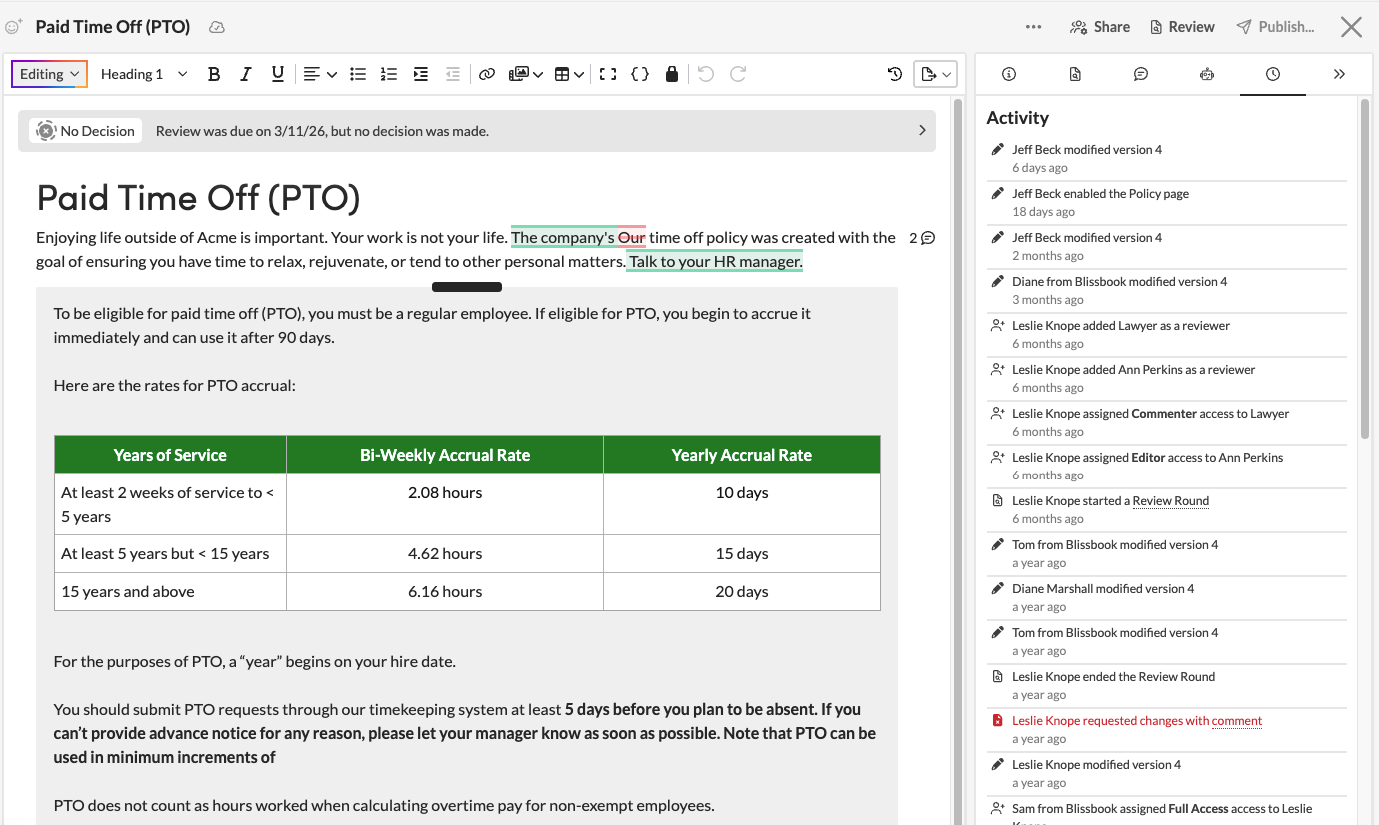
Many hands, one handbook
Your HR team works on the handbook together.
Co-edit in real time, comment with @mentions, and suggest edits that never overwrite a teammate's draft. Policy statuses are visible, and change history lets you see who changed what and when, with a redline of any two published versions. A new HR teammate can open any policy and read the comments and decisions behind it.
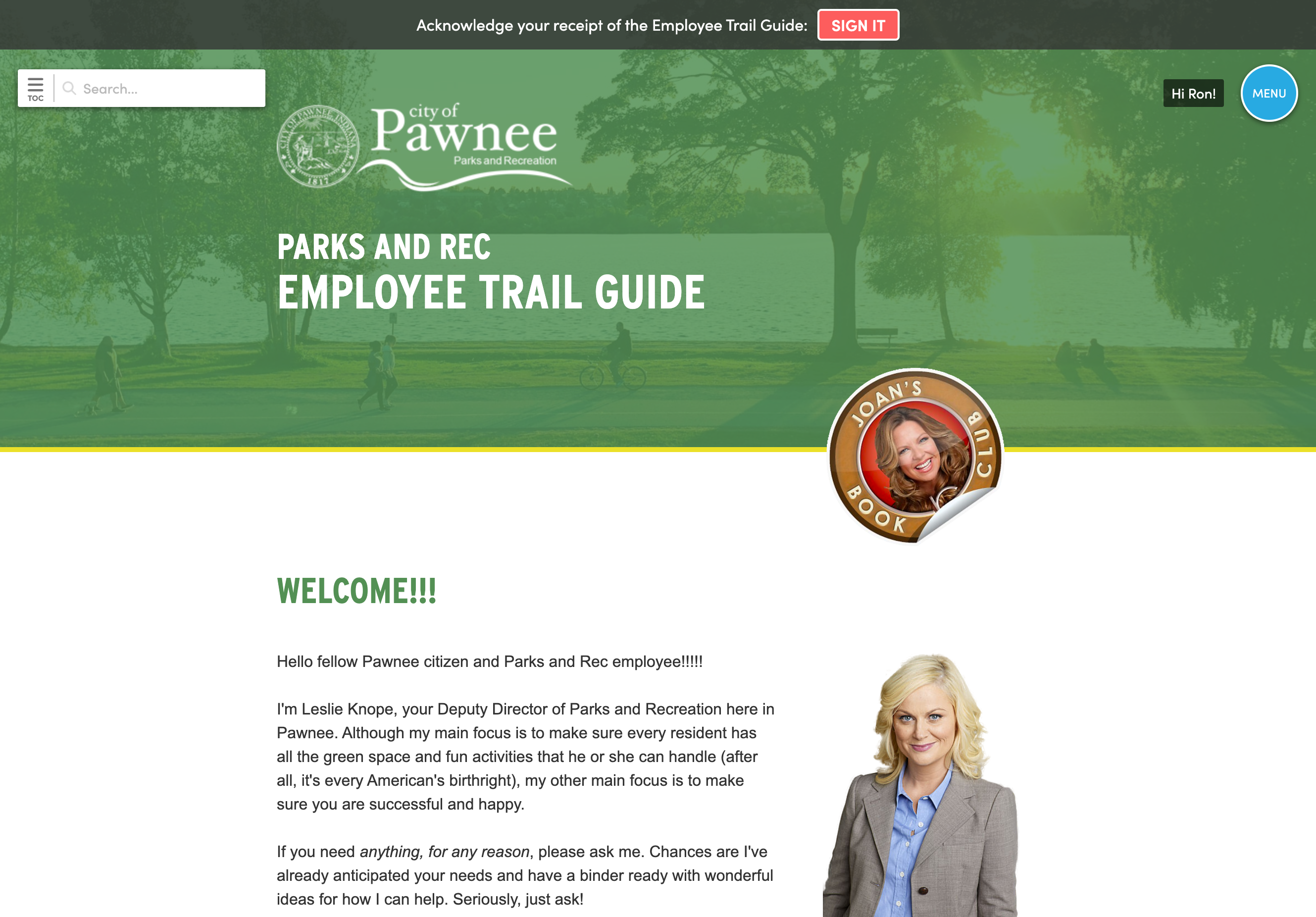
Everything in its place
Every handbook and policy lives where employees can find it.
Run your main handbook, a manager guide, and standalone policies side by side, each with its own audience and link. Employees view every handbook and policy that applies to them on one dashboard, search across all of it, and always see the latest published version. A "Signature Required" badge shows them exactly what's waiting on them.
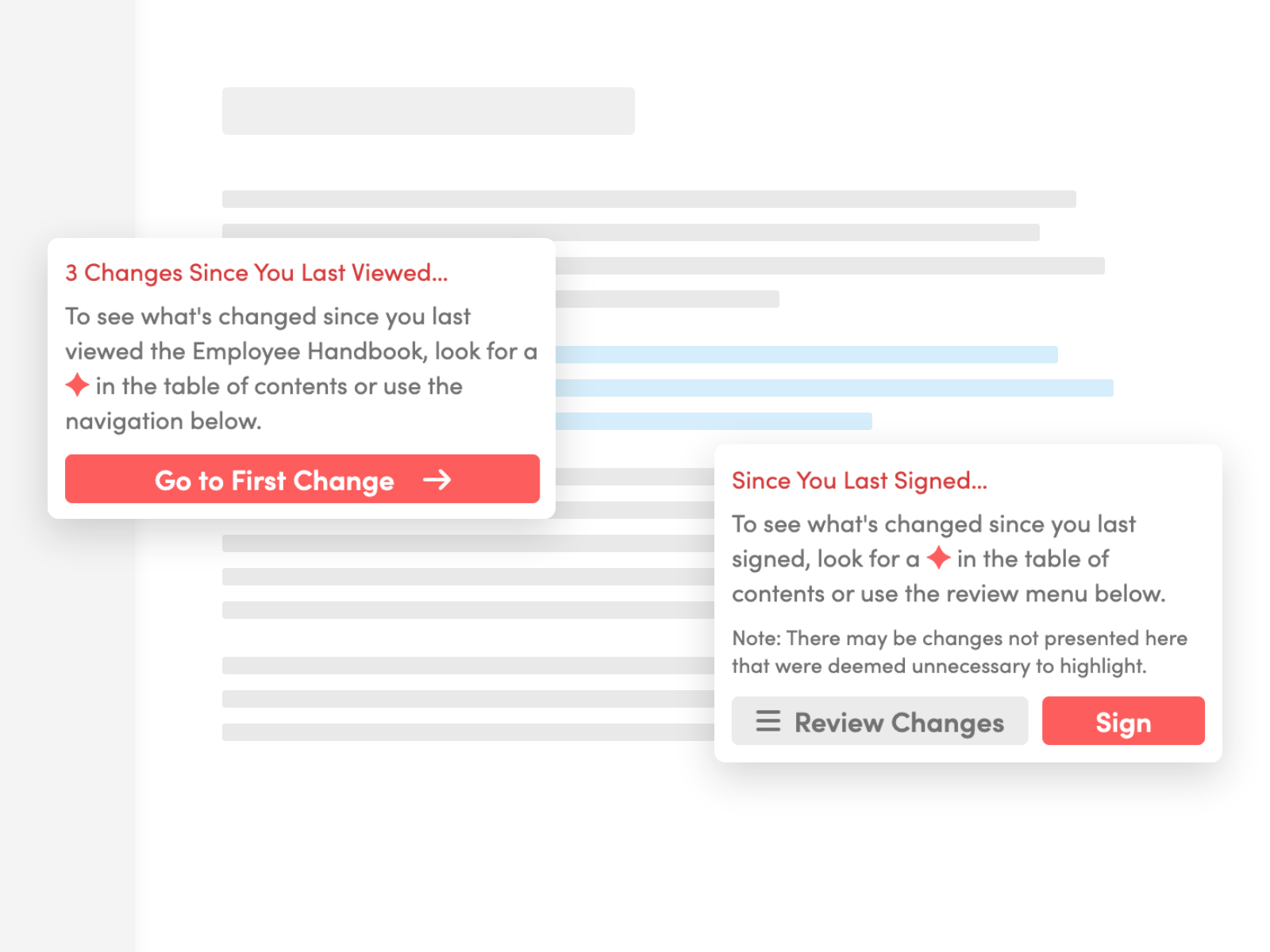
Previously on your handbook
Employees see exactly what changed in each update.
Update your employee handbook whenever something changes, and employees see what's new since they last looked, marked with annotations. Send change notification emails with links straight to the updated pages, or make small fixes with no notice at all. Your team decides how loud each change should be.
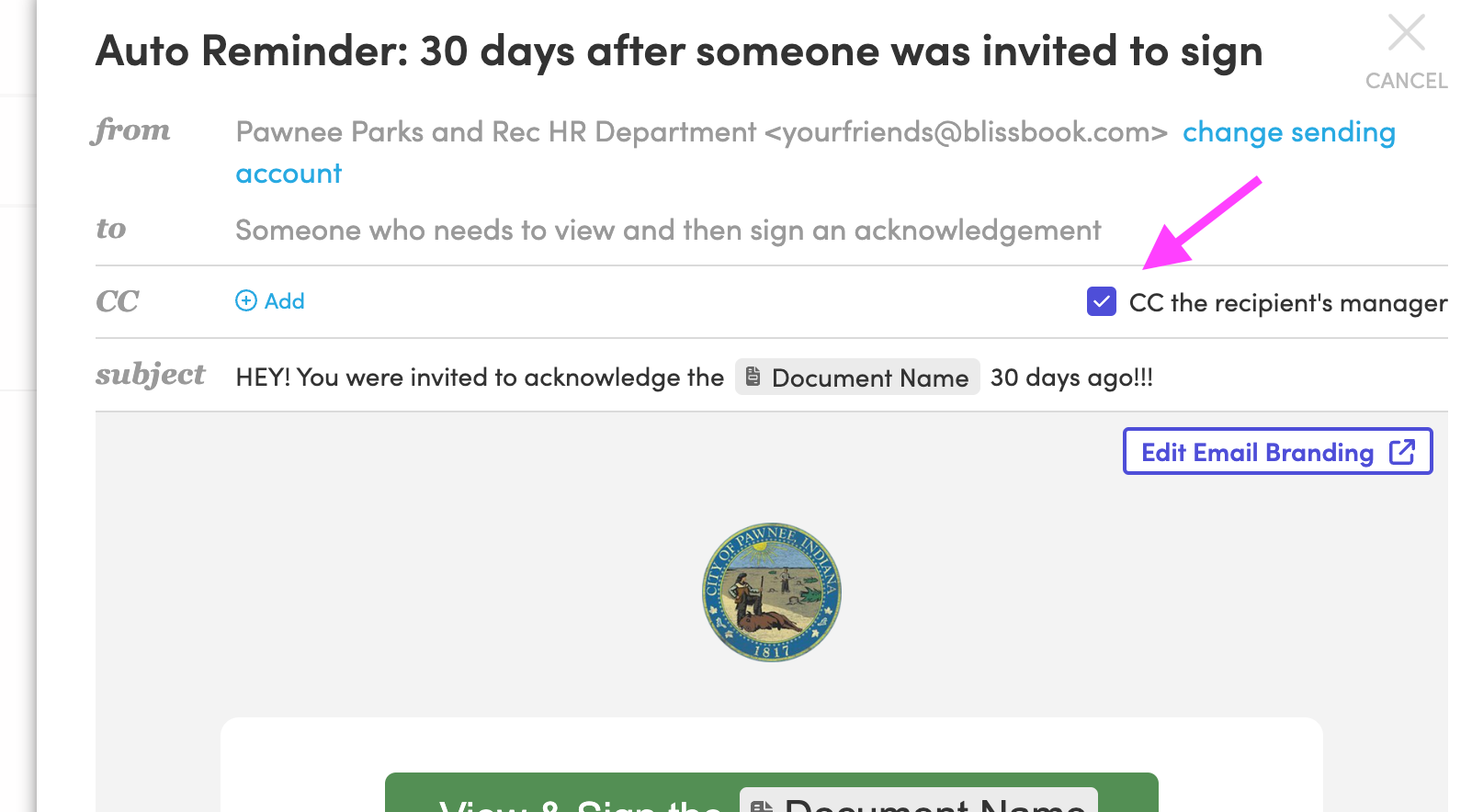
Get to 100%
Your signature process keeps moving after launch.
Automated reminders go to employees who still need to sign, on the schedule you set, with copies to their managers. New signature rounds can reach everyone or a specific group with a due date, and the Reporting Center shows who's signed, viewed, or not opened it yet. When leadership asks for signature status, you already have the report.
Less busywork
Your employee list stays current while you stay in charge.
A daily sync with more than 80 HRIS, payroll and directory platforms adds new hires, updates details, and removes people who leave. New employees automatically get their invitation, and everyone signs in through your company's single sign-on or a link emailed to them. The same sync feeds the role and location details behind personalized content.
First impressions count
Your handbook looks as polished as the company behind it.
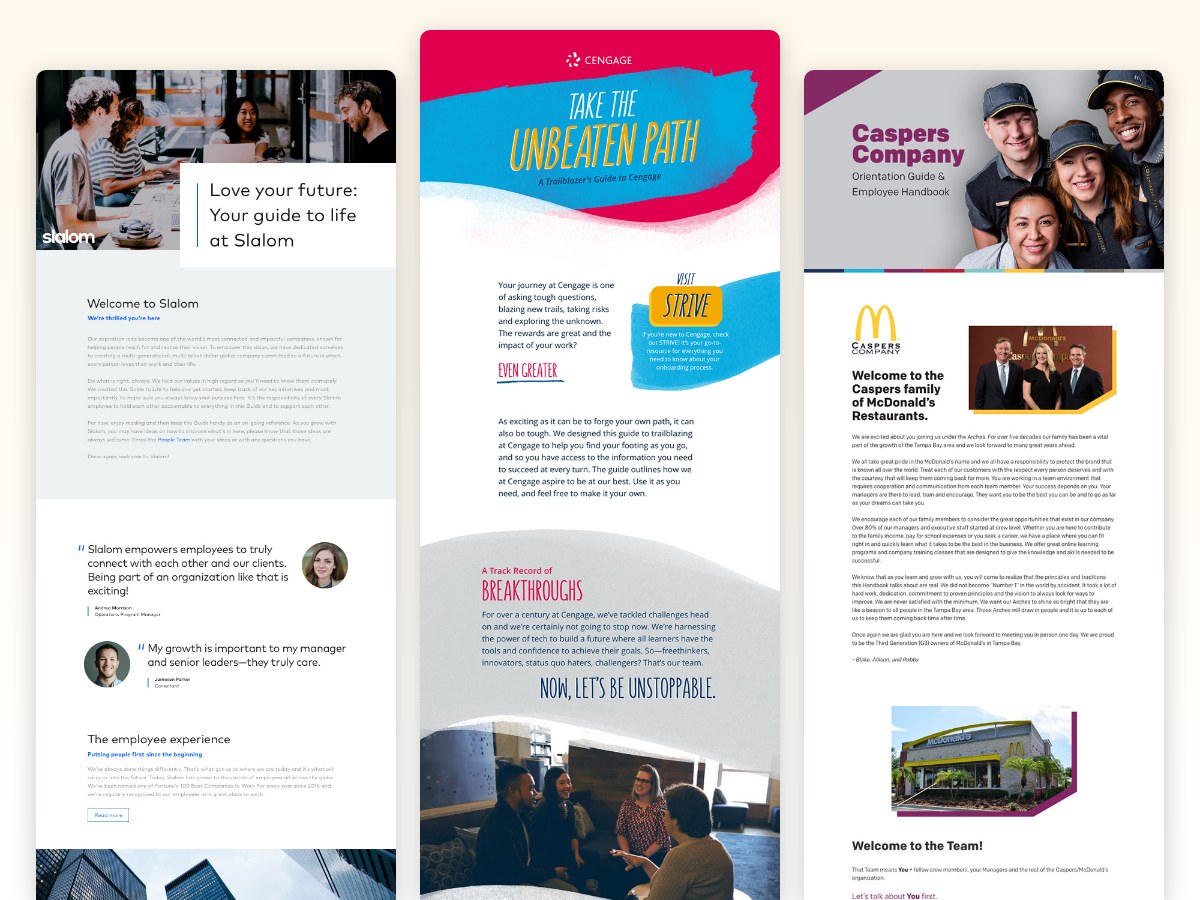
A branded online handbook uses your logo, fonts and colors, with a layout that works on phones, so employees on the warehouse floor read it as easily as the ones at a desk. Your handbook looks polished from day one, even when HR has six other things open.
Blissbook has transformed how we manage and communicate our employee handbook and mandatory acknowledgments... we've surpassed our Handbook Campaign goals in both timeliness and completion rates.
 Jill Wolfe, HR Compliance, Shutterfly
The process to collect and audit employee signatures (now electronically!) has never been easier. A major improvement and advancement for employee handbooks!
 Amy Turner, HR Operations, Cengage
We love how easy it is to update content, communicate changes with employees, and report on acknowledgements. We couldn't be happier!
 Mystel Duke, SVP HR, SWBC
Blissbook has been an outstanding partner that helped us turn 150+ handbooks into 1 - our first electronic handbook.
 Kris Cegielski, HR Business Partner, Ashley Furniture
We love how easy it is to update our Team Member Handbook and the annotations feature really simplifies communicating changes with employees.
 Concetta Lewis, People Development, Daxko
We're so glad we decided to work with Blissbook when we replaced our PDF handbook. Yes, the product is great. More importantly, when we need help, they make us feel like we're their only customer.
 Keesha-Ann Murphy, Human Capital Generalist, Russell Reynolds Associates
The result of this hard work is a beautiful global handbook we are so proud of and that is very Slalom.
 Mel Murphy, Policy & Compliance Program Manager, Slalom
Everything you need to run your handbook as a team
- Personalized content by role or location
- Employee-specific previews
- Real-time co-editing and commenting
- Change history and redlines
- Multiple documents, each with its own audience
- Employee dashboard with search
- Change annotations and notifications
- Automated invitations and reminders
- Version-specific signature records
- Reports exported to CSV or PDF
- HRIS sync and single sign-on
- Branded, mobile-friendly handbook
Questions
HR teams
ask.
Ready to run your handbook as a team?
Getting started
What happens after you request a demo
- 1
A customized walkthrough
We schedule a call and cover what you care about, from the first signature round to the report at the end.
- 2
Easy to use from day one
Blissbook is straightforward to run, so your team gets going quickly without a heavy learning curve.
- 3
Customer success by your side
We'll help with setup, content migration, and design, so your first signature round works like a charm.