How to Distribute Policy Updates and Get Acknowledgments
You update the Delaware state parental leave policy, revise your warehouse safety policy, and change the company-wide PTO policy. Then the follow-up begins: Which employees received each version? Who viewed it? Who still needs to acknowledge it?
Employee policy distribution comes down to getting it to the right people, clearly explaining the changes, and tracking acknowledgments in one place. When those stay connected, you’re not rebuilding the story from emails, spreadsheets, and shared folders later.

What should employee policy distribution include?
A reliable process connects policy preparation, employee communication, delivery, and acknowledgment tracking. Each step answers a different question:
- Who needs to see the policy? Employees may be grouped by location, state, entity, employment status, or other HR fields.
- What do they need to know? Employees need a clear explanation of what changed and what action is required.
- How will HR know what happened? The process should show who was notified, who viewed the policy, and who signed or acknowledged it.
Keep your process simple and logical so it can scale with your company (and so you won’t have to reconstruct it from various inboxes later on).
How do you identify who needs each policy update?
Start with the policy audience, not the distribution channel. Map the policy to the employee groups, locations, states, entities, or employment statuses that determine who should receive it.
For example, a policy update might apply to:
- All employees in the organization
- Employees working in a specific state
- Employees assigned to one legal entity
- Full-time employees but not contractors
Confirm the audience before preparing the message. This gives HR, legal reviewers, and other policy owners a shared definition of who should receive the update.
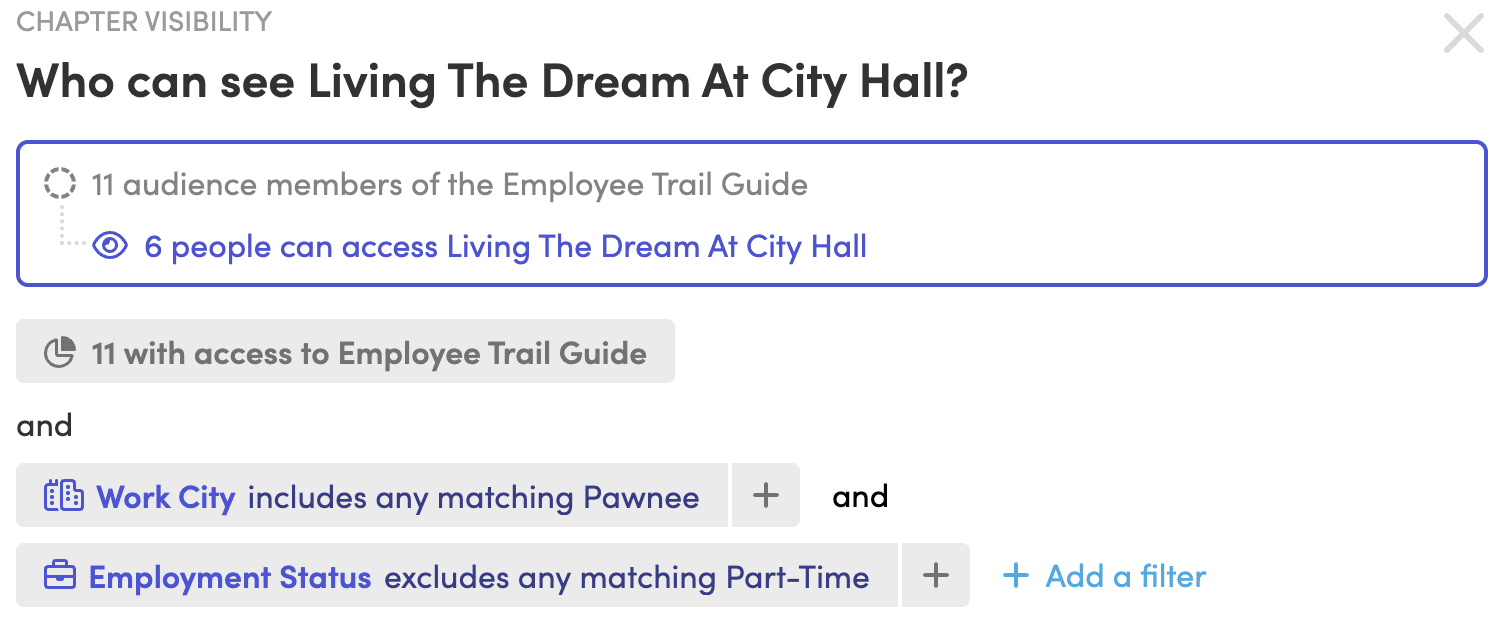
Employee data needs to support that decision. Common fields include work location, state, employment type, entity, job title, and manager. When those fields are current, you can use them to create more precise employee groups and reporting filters.
A single handbook can serve several locations when employees see only the content that applies to them. Personalized content can be based on groups or fields such as work city, state, employment status, or entity.
That approach also reduces duplicate work. Instead of rewriting the same core policy in separate handbooks, you can keep shared content together and show location-specific content to the employees who need it.
How should you prepare the policy before sending it?
Prepare one approved version of the policy, record what changed, and decide whether employees need a new acknowledgment. Sending a policy update before those decisions are made creates confusion for everyone.
Begin by identifying the change in plain language. Is the update a new requirement, a revised process, a location-specific addition, or a clarification of an existing policy? The answer should shape the employee communication.
Then confirm the review path. The people responsible for the policy should know:
- Which sections changed
- Why the change was made
- Which employees are affected
- Whether the update requires acknowledgment
- When the update takes effect
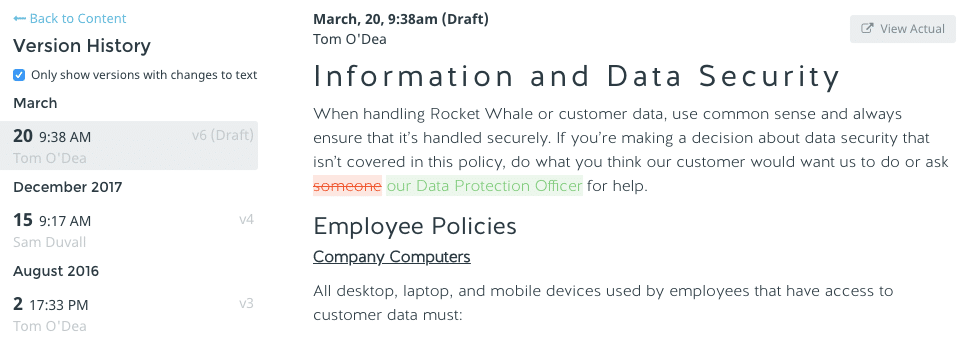
Version history keeps that record. You should be able to see what changed and when, and for policies, who made each edit. Policy version history also helps you compare published versions when someone asks which policy was in effect at a particular time.
You may still need legal review when an update involves employment law, jurisdiction-specific requirements, or a significant change to employee rights or responsibilities.
If your organization maintains policies in several handbooks, check whether the same policy appears in more than one place. A centralized policy library helps you organize policies and publish a shared update wherever that policy appears.
Want to see how a centralized policy workflow could fit your team? Explore Blissbook’s employee handbook and policy management platform.
How do you deliver updates across locations and groups?
Put the update where the audience already reads policies. A company-wide policy may belong in the main handbook, while a location-specific policy may need targeted distribution to one group.
The message should tell employees four things:
- What policy changed
- Why the change affects them
- When the change takes effect
- What they need to do next
Keep the explanation shorter than the policy itself. Employees need enough context to understand the update, but the message should point them to the complete policy rather than repeat it.
For location-based distribution, use the employee’s current work location or other relevant HR data. When an employee changes location or entity, their policy access may need to change too. That’s why employee records and policy distribution should stay connected.
A policy can also be distributed on its own when employees don’t need to review the full handbook. Direct distribution gives you a way to share a standalone policy page with a specific audience.
How do you communicate policy updates clearly?
Lead with the change employees need to understand, then explain the action required. Answer the practical questions before employees have to search for them.
For example, the message might explain that a policy was updated, identify the section that changed, state the effective date, and provide a direct path to review and acknowledge the policy.
Avoid sending only a link with a (boring) subject line such as “Updated Policy.” That leaves employees to work out what changed and whether they need to do anything. It also makes follow-up harder when someone says they didn’t understand the request.
Use the same terms in the communication and the policy. If your handbook has a “remote work policy,” don’t call it a “work-from-home guide” in the email. Consistent language helps employees connect the message to the policy they’re reviewing.
For larger updates, explain the change in sections. A short summary can introduce the update, followed by the full policy and acknowledgment request. This gives employees context without rewriting the policy itself.
If employees access policies through different channels, confirm that each group can reach the content. Some employees may use email and single sign-on, while others may need access through a shared computer or another sign-in method.
How do you track employee acknowledgment?
Track notification, viewing, and acknowledgment separately. An employee who received an email may not have opened the policy, or they may have viewed it, but not signed it.
A useful tracking process shows:
- Who was notified
- Who viewed the policy
- Who signed or acknowledged it
- Which employees still need to act
- Which version each employee saw
New signature rounds can request a new acknowledgment after a major policy update, even when employees signed the policy previously. You can target everyone in the document’s audience or select specific employees.
If employees saw different versions based on their location or group, you need to know what each person could see when they signed.
Blissbook’s reporting center shows which employees were notified, viewed, and signed each document, and lets you open an employee’s record to view or print the exact version they received. You can filter reports by groups, manager, hire date, compliance status, and other fields, then exported for further review. This gives you a clearer record than a sent-email folder or a manually updated spreadsheet.
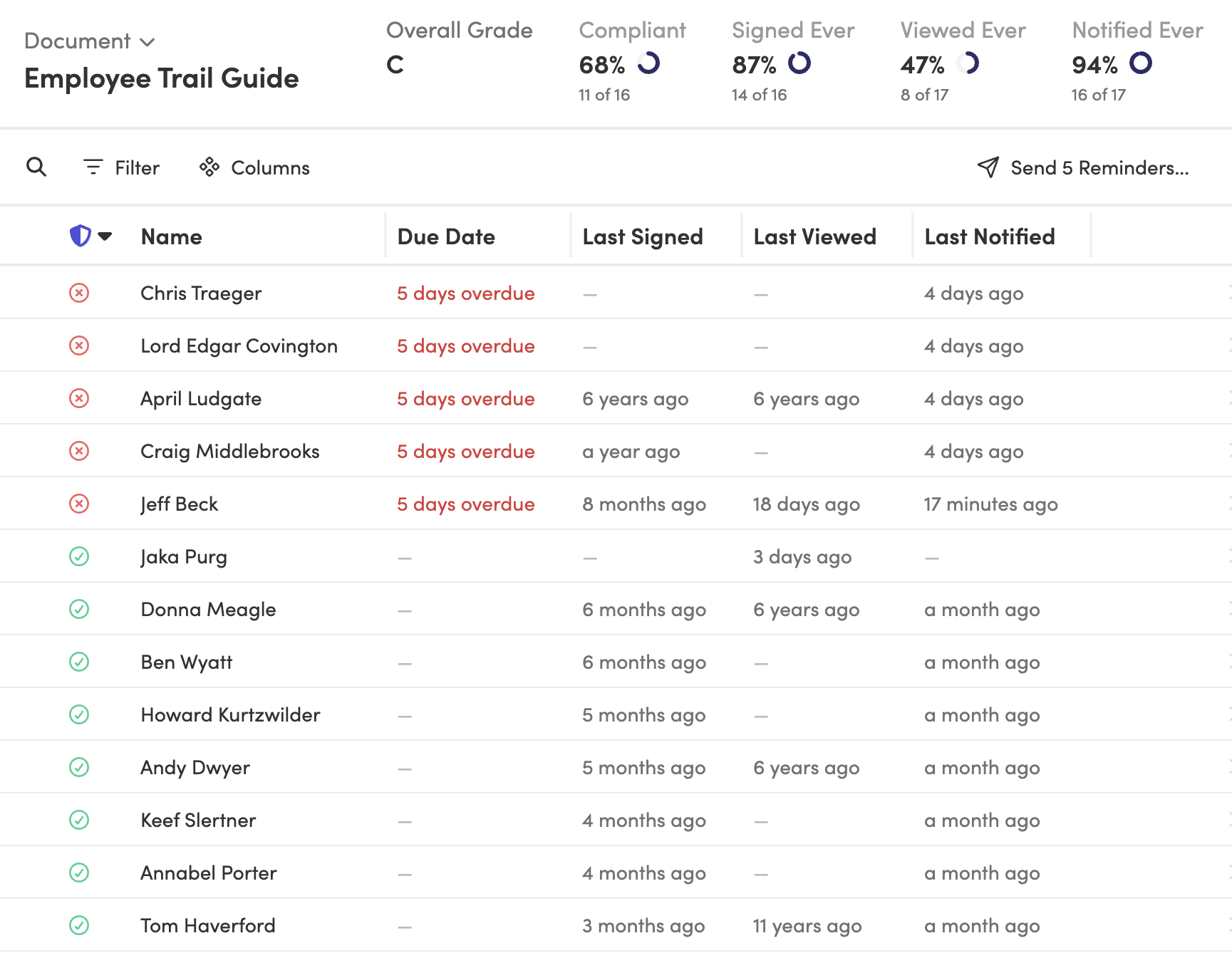
Tracking signatures across four states from a spreadsheet? Request a demo and see how the reporting works.
What should you do when employees haven’t signed?
Use reminders and manager follow-up based on the type of gap. Someone who hasn’t viewed the policy may need a clearer message or easier access. Someone who viewed it but hasn’t acknowledged it may need a reminder to do so.
Automated reminders go to employees who still need to sign. You can set the timing, customize the email, and choose who’s copied on the reminder. This keeps the follow-up tied to the original policy distribution process.
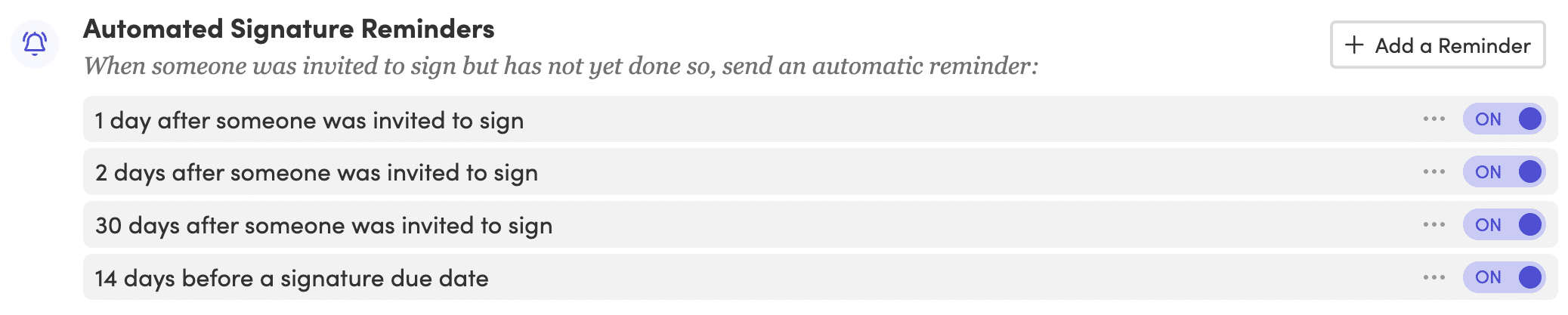
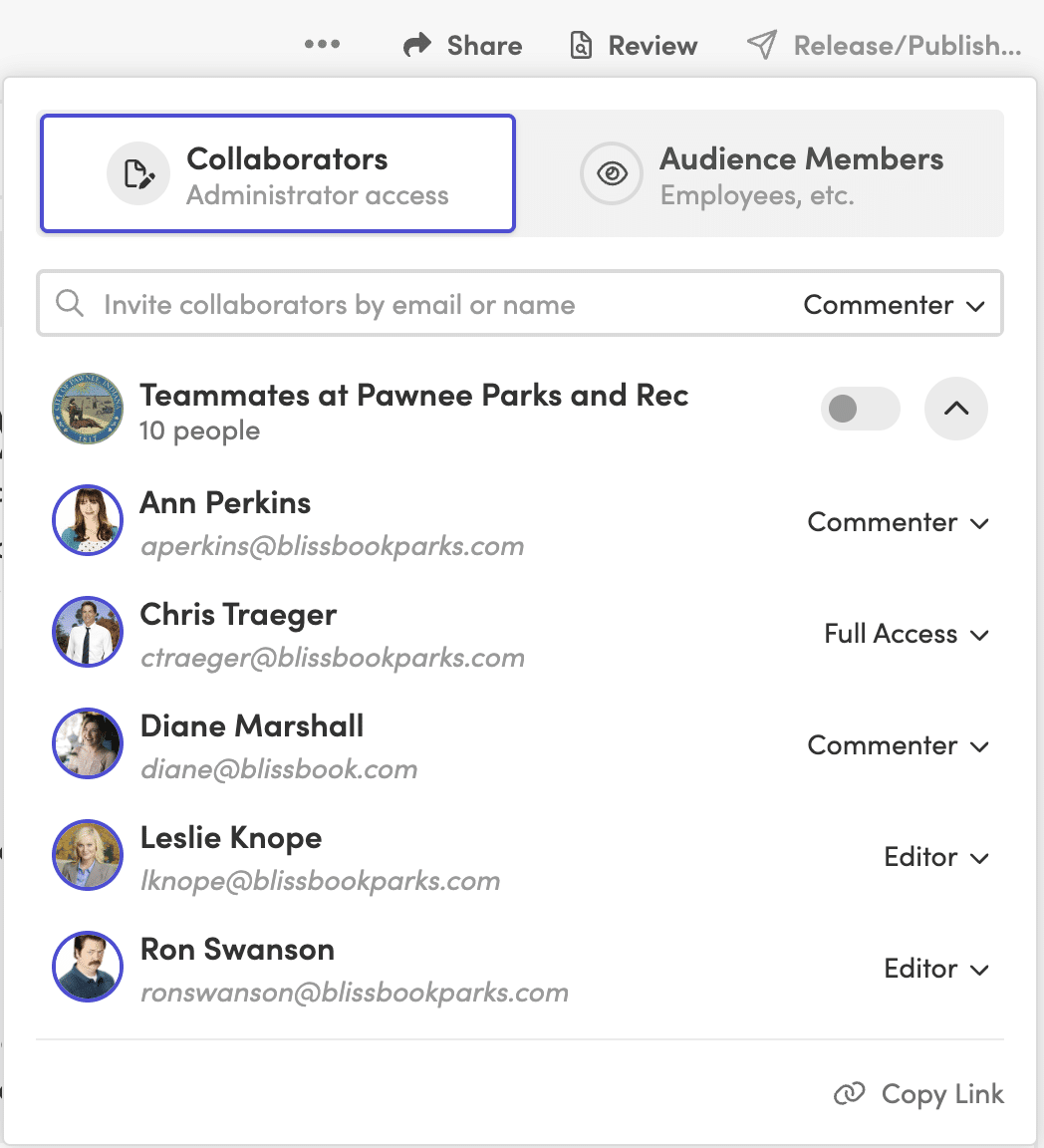
Managers can also help with follow-up when they can see their team’s status. Automated manager escalation copies managers on reminders, gives them a view of their team’s signature status, and lets them send reminders to direct reports.
Use a consistent escalation path. For example, the first reminder may go only to the employee, while later reminders may include the manager. The reminders should reflect the policy’s effective date and the level of action required.
Track exceptions separately. Employees on leave, new hires, former employees, contractors, or people without regular email access may need different handling. A report that separates those groups helps you focus on unresolved acknowledgments instead of treating every incomplete record the same way.
Employee Policy Distribution Checklist
Before distributing an updated policy, confirm that:
- The policy owner has approved the final version.
- The affected locations, entities, and employee groups are defined.
- Employee data supports the audience rules.
- The policy’s effective date is clear.
- The employee communication explains what changed.
- The acknowledgment requirement is stated plainly.
- Reminder timing and manager follow-up are planned.
- You can report who was notified, who viewed the policy, and who acknowledged it.
Employee Policy Distribution FAQs
What is employee policy distribution?
Employee policy distribution is the process of delivering workplace policies to the employees who need them, explaining what changed, and tracking whether they reviewed and acknowledged the policy. It can include company-wide, location-specific, entity-specific, or group-specific updates.
How do you distribute policies to employees in different states?
Use employee data such as work location or state to identify the correct audience. Employees can then receive the policy content and acknowledgment form that apply to their location, while shared policies stay available across the organization.
Should employees acknowledge every policy update?
No. The acknowledgment requirement depends on the policy and the significance of the change. Major updates may call for a new signature round, while smaller edits may only need notification or documented review.
How long should you keep employee acknowledgment records?
Keep records according to your organization’s retention policy and any applicable legal or regulatory requirements. Legal review may be needed to determine the right retention period for your policies and employee records.
What should HR do when employees don’t have work email?
Provide another approved access method, such as single sign-on, a shared computer kiosk, or employee ID sign-in with a verification code. The distribution process should still record each employee’s access and acknowledgment status.