Best Employee Handbook Software for Audit-Ready HR

An auditor asks for proof that your California warehouse team acknowledged an updated meal-break policy last quarter. You open a shared drive, scroll through three versions of a Word doc, and realize the signature spreadsheet only covers your Texas office. That gap between “we sent it” and “we can prove who read what, and when” is where employee handbook software earns its keep.

For HR leaders managing a multi-state workforce, the problem compounds fast. Each jurisdiction layers its own leave, harassment, and wage rules on top of federal requirements. You need a system that tracks every policy variant, every version change, and every employee acknowledgement, then packages that history into reports an auditor can trust. Employee handbook software built for that job replaces the patchwork of PDFs, email threads, and shared drives many teams still rely on.

HR leader reviewing employee handbook software on a laptop, with policy acknowledgement status and audit records on screen

Six Criteria for Audit-Ready Employee Handbook Software

Before comparing vendors, get clear on what “audit-ready” requires. These six criteria separate a handbook builder from a compliance records system.

1. Multi-State Policy Variants

Can you manage a single policy that automatically shows the right content to employees in different states? Or do you maintain a separate handbook for each location? One source of truth, with personalized content per state or entity, cuts the risk of outdated versions floating around.

2. Version History and Audit Trails

Every policy edit should be logged: what changed, who published it, and when. During an audit or litigation hold, you need to pull the exact version an employee signed, not just the current one. Look for a diff view that shows the before and after of each revision.

3. Acknowledgement Tracking and E-Signatures

Collecting signatures is half the job. The other half is tying each signature to the specific policy version the employee read. Your system should record the timestamp, the content version, and the employee’s identity in a way that holds up under scrutiny. Automated reminders and escalation workflows get you close to 100% coverage with far less manual follow-up.

4. Reporting and Exports

Audit-ready records mean nothing if you can’t pull them quickly. Filter by location, department, manager, or signature status. Export to PDF or CSV. Save custom report views so you’re not rebuilding the same report every quarter.

5. HRIS and SSO Integrations

Your employee list should sync automatically from your HRIS, payroll, or directory platform. Manual imports introduce errors and stale records. SSO (SAML 2.0 or equivalent) keeps access secure and reduces password-reset tickets.

6. Security

Look for SOC 2 audit reports (not just a “SOC 2 compliant” badge), encryption in transit and at rest, and role-based access controls. If you operate in regulated industries, confirm the vendor’s data residency and retention policies meet your requirements.

Comparison Table

Based on each vendor’s published product, help, and security pages as of September 2026. “Not advertised” means we couldn’t find the capability documented, not that it’s confirmed missing.

ToolsLocation-based content in one handbookVersion comparison and audit trailSignature tied to versionSaved custom report viewsHRIS integrationsSOC 2 reportLaw change updates
Blissbook✓✓✓✓80+Type I and Type II✓ (US)
AirMasonSeparate documents per group✓✓Not advertisedAbout 13Type II✓
SixFiftySeparate versions per groupAudit trail; diff not documented✓Not advertisedHRIS or payroll syncNot published✓
BLR Employee Handbook BuilderState supplements✓Sign-and-return formsDashboard (Enterprise)Not advertisedNot published✓
SHRM Employee Handbook BuilderState supplements✓Sign-and-return formsDashboard (Enterprise)Not advertisedNot published✓
VirgilHRSeparate handbooksNot advertisedE-signature; version link not documentedNot advertisedBambooHR, PaycorBadge; type not stated✓
HandbookHubNot advertised✓✓Signature dashboardNot advertisedNot publishedSuggests gaps
Handbooks.ioNot advertisedNot advertisedSignature captureNot advertisedPartner APINot published✓
NotionPage-level permissions only✓ (retention by plan)Not nativePage view analyticsIdentity only (Enterprise)Type IINot native
ConfluenceMarketplace app✓Marketplace appMarketplace appIdentity only (Guard add-on)Type IINot native
CanvaNot nativePartialNot available yetDesign view insightsIdentity only (Enterprise)Type IINot native
Word + PDFSeparate files per state✓ in SharePoint; lost in exported PDFsSeparate e-sign toolUsually a spreadsheetIdentity only (Entra ID)Type II (Microsoft 365)Not native

Vendor Profiles

The tools HR teams compare fall into three groups: policy management platforms, handbook builders that generate policy text, and general-purpose tools teams adapt into a handbook.

Blissbook: Built for Audit-Ready Employee Policy Management

Blissbook treats the employee handbook as both a compliance record and an employer brand asset. You manage all your policies in a single policy library, and Blissbook’s personalized content features show each employee only the policies that apply to their state, entity, or group. That means one source of truth instead of a separate document per location.

Every policy edit is tracked with revision history, and you can compare any two published versions in a redline view. When you collect e-signatures, Blissbook records the exact content each employee saw when they signed, and you can export it with their signature for the whole handbook or a single policy. The reporting center lets you filter by location, manager, department, or signature status, and export to CSV or PDF (API access is an add-on). Saved report views mean you don’t rebuild the same audit report every quarter.

Blissbook integrates with 80+ HRIS, payroll, and directory platforms, plus SAML 2.0 SSO. Your employee list syncs daily, so new hires get the handbook automatically and people who leave are removed without manual cleanup. Automated reminders and manager escalation help you reach full signature coverage.

On the security side, Blissbook has completed SOC 2 Type I and Type II audits, undergoes third-party penetration testing at least every 18 months, and benchmarks against WCAG 2.2 accessibility standards.

Two limits worth knowing. There’s no self-service signup, so the Blissbook team sets you up. And Law Change Alerts (which flag US federal, state, county, and city law changes) and the Labor Law Change Updates add-on (which suggests edits to your handbook) cover US law only.

AirMason

AirMason pairs a visual handbook editor with a compliance engine that monitors employment law changes at the federal, state, county, and city level. Its HR team and employment attorneys review suggested policy updates before they reach your dashboard, and you can republish and recollect signatures with a single click. AirMason offers about a dozen HRIS integrations, including Workday, BambooHR, ADP, and UKG, and has a SOC 2 Type II report.

Audience targeting in AirMason works at the document level, so multi-state teams typically manage separate handbooks or addenda by location rather than conditional content inside one handbook. Reporting uses fixed filters with CSV or PDF exports; saved custom report views aren’t documented.

SixFifty

SixFifty, now a Paychex company, focuses on automated handbook creation. You answer questions about where your employees work, and it generates state, city, and county policies built by its legal team. Its legal experts track law changes and draft updated policies for you to apply. Employees review and sign in a portal, and SixFifty offers HRIS or payroll syncing plus an audit trail for handbook activity and signatures.

SixFifty groups employees by role, location, or team so each group gets its own version of the handbook, rather than conditional content in a single document. It doesn’t publicly document saved report views or a SOC 2 report, so ask about both during evaluation.

BLR Employee Handbook Builder

BLR (a division of Simplify Compliance) sells a questionnaire-based Employee Handbook Builder. You answer configuration questions, and it produces a policy library covering federal law, all 50 states, and select municipalities, reviewed by the employment law firm Jackson Lewis. Policy updates vetted by employment law experts arrive by email and in the platform. An April 2026 redesign added side-by-side policy comparisons and revision history, and the Enterprise edition adds an activity and publishing dashboard. It lists at $499 a year.

Multi-state handbooks are built as a general handbook plus state supplements, and BLR doesn’t advertise showing different content to different employees. Acknowledgement runs on forms employees sign and return rather than tracked e-signatures. HRIS integrations, SSO, and a SOC 2 report aren’t listed.

SHRM Employee Handbook Builder

SHRM sells an Employee Handbook Builder as a partner product, hosted on BLR’s handbook platform. A $499 annual subscription covers federal policies and all 50 states, with an email whenever a provision is updated or added. You can share the handbook online with employees or print it.

SHRM’s pages don’t describe how multi-state content combines, and they don’t mention version comparison, e-signatures, reporting, or HRIS integrations. If it’s on your shortlist, ask which of those features are included.

VirgilHR

VirgilHR is an HR compliance platform, and its handbook builder sits alongside a compliance chatbot, multistate law comparisons, and legal alerts. You answer a short questionnaire or upload your existing handbook, and it checks for missing policies by jurisdiction. Law change coverage runs from federal down to county and local levels, updated daily, and a built-in e-signature feature sends the handbook for acknowledgement. BambooHR customers can get it as Compliance Intelligence by VirgilHR. Pricing is quote-based.

VirgilHR supports federal, state-specific, or combined handbooks, but doesn’t advertise per-employee content inside one handbook. Version comparison, signature-to-version tracking, and reporting aren’t documented, and its site shows a SOC 2 badge without stating the report type.

HandbookHub

HandbookHub is an AI handbook generator for small and midsize businesses. You describe your business or upload an existing handbook, and it drafts one using a jurisdiction-aware rules database and 20+ industry templates. It keeps version history with comparisons, tracks signatures by version with reminders and CSV export, and suggests gaps when rules in your states change. Pricing starts at $19 for a single handbook.

HandbookHub itself says it doesn’t replace legal counsel, so plan on review time. HRIS integrations, SSO, and a SOC 2 report aren’t advertised, and reporting is a signature dashboard rather than saved report views.

Handbooks.io

Handbooks.io is a handbook builder for small and mid-sized teams. It covers all U.S. states and major local jurisdictions, shows only the policy updates relevant to your company on its dashboard, and includes electronic signature capture, a shareable handbook link, and Spanish translation.

Handbooks.io doesn’t offer audience-specific content within a handbook or built-in HRIS connectors (approved partners can integrate through its API). Its product pages don’t describe version comparison, reporting beyond signature capture, or a SOC 2 report.

Notion

Notion is a workspace for docs and wikis, and plenty of teams use it for an internal handbook. Page history shows highlighted changes (kept 7 to 90 days depending on plan, unlimited on Enterprise), page analytics show who viewed a page, and it has a SOC 2 Type II report. SAML SSO starts on the Business plan.

Permissions work per page, so there’s no conditional content inside a page. There’s no native acknowledgement feature. Teams often use Notion Forms as a workaround, but a form response isn’t tied to a page version. HRIS data only reaches Notion through identity provisioning on Enterprise, and there’s no employment law monitoring.

Confluence

Confluence is Atlassian’s team wiki. Version history lets you compare any two versions of a page and restore one, audit logs start on the Standard plan, and it has a SOC 2 Type II report. SSO and user provisioning come through the Atlassian Guard add-on.

Handbook features depend on marketplace apps. Read & Confirm records which page version each person confirmed and asks for re-confirmation when the page changes, and Visibility for Confluence shows or hides content by group. Each is a separate purchase on top of your Confluence plan. There’s no HRIS connector for employee data and no employment law monitoring.

Canva

Canva is a design platform, and a popular pick when the goal is a handbook that looks good. Paid plans keep up to 1,000 versions of a design, design insights show who viewed it, and it has a SOC 2 Type II report. SSO is on the Enterprise plan.

Canva can’t send documents for others to sign yet (it says that’s planned), and access works per design rather than per section. Most Canva handbooks end up exported as PDFs, which brings the Word + PDF limits below.

Word + PDF

Word documents stored in SharePoint or OneDrive and sent to employees as PDFs are the default for many teams. While the file lives in SharePoint, version history and Word’s Compare feature work well. Microsoft 365 is covered by SOC 2 Type II, SSO comes with Entra ID, and Microsoft 365 eSignature (pay-as-you-go, using Adobe Acrobat Sign or DocuSign) can collect signatures on a specific file.

The gaps show up after distribution. Multi-state teams keep a separate file per state, an exported PDF leaves version history behind, and nothing rolls up who hasn’t signed across the company, so that tracking usually lives in a spreadsheet.

How does multi-state workforce compliance affect your handbook?

Employment law varies by state, county, and sometimes city. California requires meal breaks. Texas has no meal-break law for adult workers. New York City’s salary transparency requirements don’t apply in Houston. When you operate in multiple jurisdictions, your handbook needs to reflect every applicable rule for every employee.

The risk of getting this wrong is concrete: an employee in a state with mandatory sick leave sees a handbook that doesn’t mention it. That creates a documentation gap that can surface during a Department of Labor inquiry or a wrongful termination claim. You don’t need a separate PDF for every state. A platform that personalizes content by location shows each employee the version that applies to them, and you edit it in one place.

What makes HR compliance records audit-ready?

Good HR compliance management comes down to records that answer three questions without ambiguity: which policy version was active on a given date, which employees received it, and when each person acknowledged it. That chain of evidence needs to be exportable, filterable, and time-stamped.

The common failure point is version control. If you update a harassment policy in March and collect new signatures in April, your records need to show that the March version was the one employees signed, not the draft from January. A policy acknowledgement without a content version link is an incomplete record.

Buyer Checklist for Employee Handbook Software

Use this list when evaluating demos and RFPs for enterprise HR software:

  • Can you show personalized policy content to employees in different states from a single document?
  • Does the version history include a diff view showing exactly what changed in each revision?
  • Are e-signatures tied to the specific content version the employee read, not just the document title?
  • Can you filter signature reports by location, department, or manager and save those views?
  • Does the platform sync your employee list automatically from your HRIS or directory?
  • Has the vendor completed a SOC 2 audit (Type I or Type II), and can you review the report?
  • Does the platform support SAML 2.0 SSO?
  • Can you export records to PDF, CSV, or via API for your own retention?
  • Does the vendor track US labor law changes and alert you when your policies need updating?
  • What implementation support is included, and how long does a typical rollout take?

Blissbook covers each item on this list, from version-linked signatures to saved report views. If your current setup can’t answer the auditor’s question about who read what and when, that’s the gap worth closing. Request a Demo

Employee Handbook Software Features That Matter Most

The three most important employee handbook software features are version control, location-based policy management, and acknowledgment tracking. They come first because they keep policy content accurate, show each employee the rules that apply to them, and document who received, viewed, and signed each version.

Someone updates the PTO policy, then asks which version is current. The answer depends on which document, shared drive, or local file they opened.

At 50 employees, that confusion is manageable. As headcount, locations, and policy owners increase, it gets harder to check by hand. The right software reduces that uncertainty while leaving policy decisions with HR.

Digital employee handbook with version history, location-based policies, and signature tracking

1. Can You Edit Policies and See Exactly What Changed?

Every other feature depends on employees reading the current policy, which makes version control the foundation.

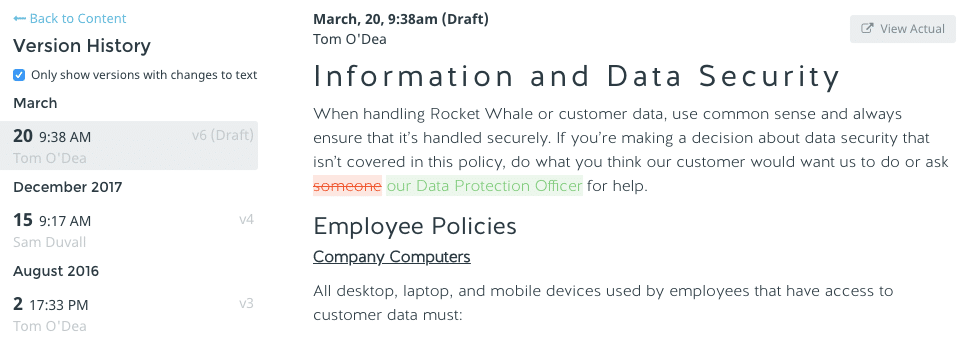
A useful platform lets your team edit policies in one place, review proposed changes, and see the history behind each published version: what changed, when, and who changed it.

That record matters once several people contribute. HR may own the process, while legal, finance, or department leaders review individual policies. Without a clear history, basic questions get hard to answer:

  • Which version did we publish?
  • Who reviewed it?
  • What language changed?
  • Which employees signed after the update?

Section-level and document-level version history should make additions, deletions, and formatting changes easy to spot, and side-by-side comparisons help when a policy has changed more than once. A central policy library adds one more benefit: when the same policy appears in several handbooks, you edit it once and publish the change everywhere it appears.

The practical test: ask a vendor to show you how to compare two published versions of the same policy. If the answer involves exporting files or checking multiple folders, the feature won’t hold up as your team grows.

Blissbook version history comparing two published versions of a policy, with added text in green and deleted text in red

2. Can the Handbook Handle Multiple States and Locations?

Once you hire in a second state, one set of rules stops covering everyone.

Some policies apply to all employees. Others depend on where someone works, which entity employs them, or how they’re classified. Software should let you manage those differences from one shared structure, showing a chapter, section, policy, or single paragraph only to the employees it applies to, based on fields like work location, state, employment status, or entity.

That keeps you from maintaining separate handbooks with repeated content, and employees don’t have to sort through rules that don’t apply to them. If you’re still deciding how to structure a multi-state handbook, settle that first.

Acknowledgments should follow the same logic. If employees in different locations see different content, each acknowledgment should reflect what that employee was shown. Before publishing, administrators should be able to preview the handbook as a specific employee.

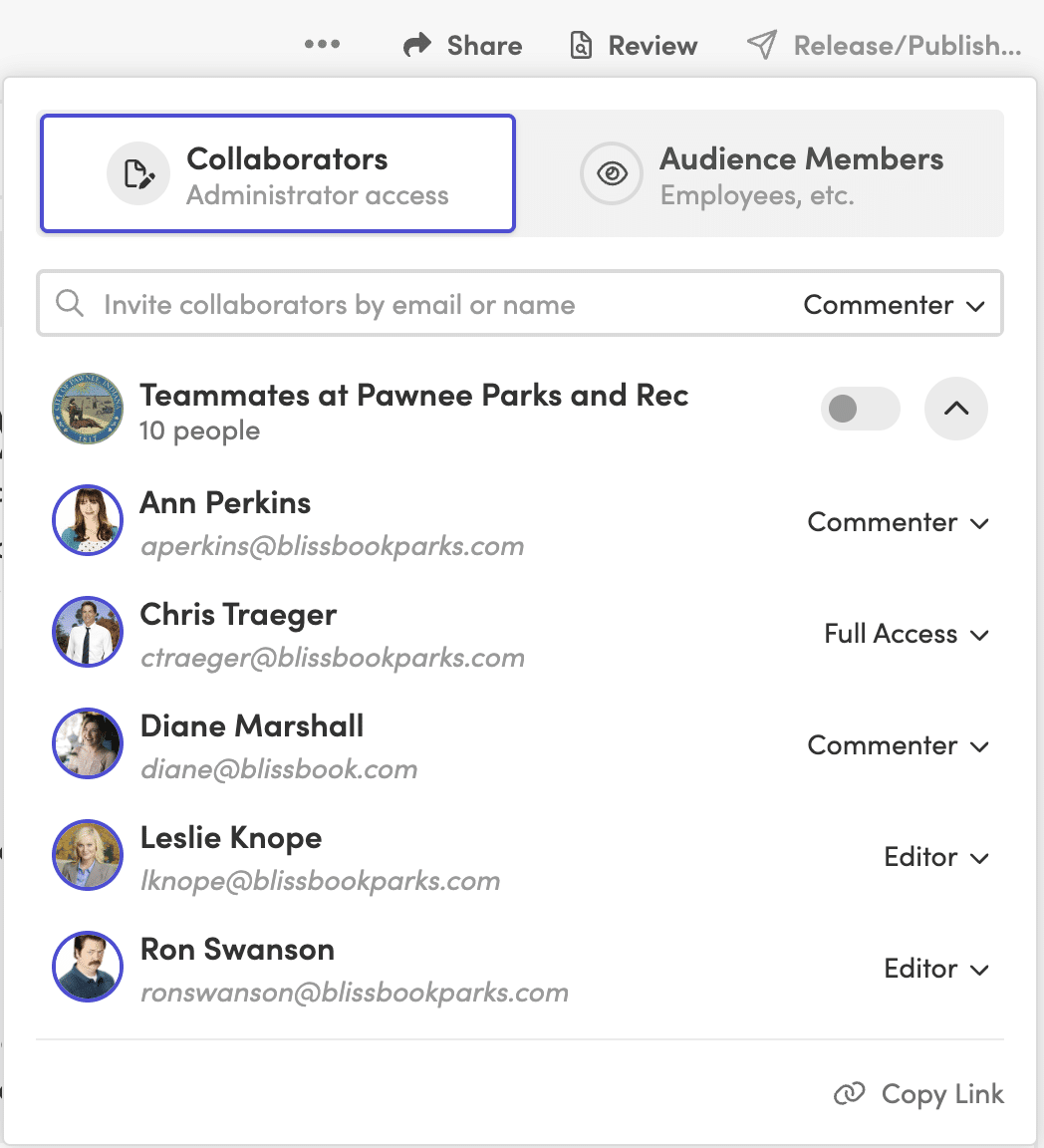
Policy sharing panel with audience filters limiting a policy to employees in a specific location

Labor law updates belong in this evaluation too. A service that tracks policy-impacting changes across city, county, state, and federal jurisdictions gives HR a clear starting point when a policy needs review, and some services also suggest edits to your existing policy language. Software doesn’t replace legal review, though. Have qualified counsel review policy language and proposed changes before you publish.

Managing handbooks across several states? See how personalized handbooks work.

3. Can You Track Signatures and Acknowledgments?

Sending a policy proves it left your outbox, not that anyone read or signed it.

As the team grows, following up one person at a time stops working. A strong platform lets HR request electronic signatures, start a new signature round after a major update for everyone or only the affected employees, and see who still needs to sign.

Reminders should do most of the chasing. Look for control over reminder timing and wording, plus the option to copy managers. Bringing managers in helps when specific teams fall behind.

The record behind the signature matters as much as the signature. The platform should keep the exact content each employee could see when they signed. When personalized content means people received different versions of a policy, that record is what lets HR answer questions later.

4. Does It Connect to Your HRIS?

Every hire, departure, and manager change alters who should see your handbook.

When HR maintains the handbook audience by hand, the list drifts. A new hire gets missed. A former employee stays in a report. A manager change never reaches the person responsible for follow-up.

An integration with your HRIS, payroll system, or directory closes that gap. Check which fields it can use, such as work location, employment type, job title, and manager, because those same fields can drive personalized content, reporting filters, and manager follow-up. Also ask how often it syncs. Blissbook, for example, syncs with 80+ HRIS, payroll, and directory platforms once a day, adding new hires and removing people who have left.

A long integration list matters less than the right connection. Confirm the software supports your system and the employee fields your handbook process depends on.

5. Can Employees Find Answers on Their Phones?

Policy questions come up mid-shift, between meetings, or away from a desk, so the handbook has to work where the question starts.

A digital handbook should open in a mobile browser without a file download, stay readable without zooming, and let employees search using the words they’d naturally type, like “time off” rather than the exact policy title. For HR, the same search should make it easy to find related policies and avoid creating duplicates.

If part of your workforce is deskless, seasonal, or shares devices, check how people without a work email sign in. Depending on the platform, options may include single sign-on, kiosk access, or employee ID verification.

Then run a quick test: give someone a common question, a phone, and no help. If they can’t find the answer, your employees won’t either.

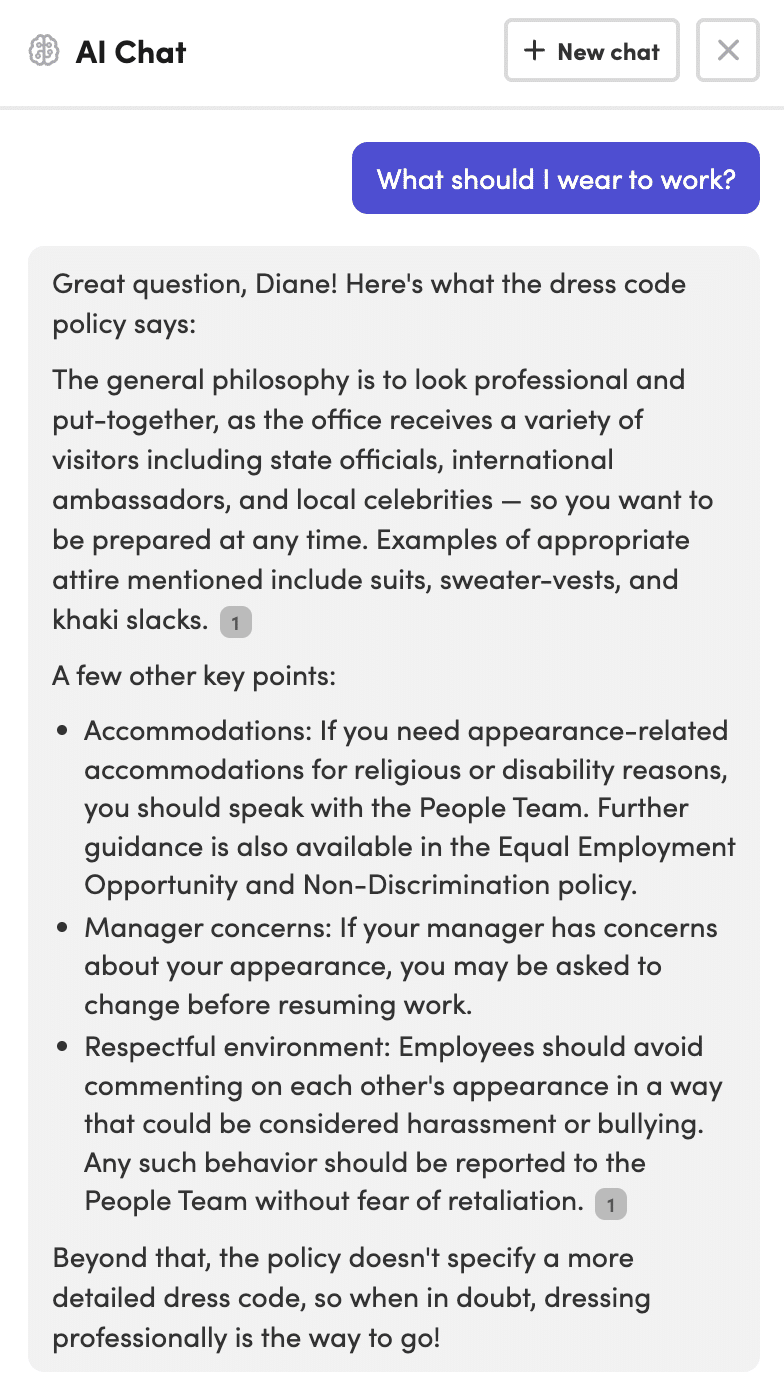
Employee handbook chat panel answering a policy question in plain language with a link to the source section

6. Can You Report on Views, Signatures, and Policy History?

A final signature count tells you how many people signed. It doesn’t tell you where the process stalled.

Reporting should separate employees who were notified, who viewed the document, and who signed it. As you grow, filters become essential:

  • Group or location
  • Manager
  • Hire date
  • Signature status
  • Former (archived) employees

Export options help when HR needs to share a report or document a specific record. Reports should also show the exact content an employee saw when they signed, which matters most when your handbook uses personalized content.

A report for one document shows whether a rollout is working. A report across all documents shows the broader gaps, without combining spreadsheets by hand.

7. Can It Scale Beyond the First Handbook?

Scalable software absorbs new locations, entities, reviewers, and documents without making HR rebuild the process each time.

The daily work shifts as you grow. More people review content, more groups need different policies, and administration (former employees, manager changes, repeat signature rounds, shared policies across documents) often creates more work than the original launch.

The best test is to describe your next stage of growth and ask the vendor to walk through it: add a new location, assign a new policy reviewer, update a shared policy, and request fresh acknowledgments from only the affected employees. A repeatable process is a good sign. A series of manual workarounds is exactly what you’re trying to leave behind.

Want to walk through your next stage of growth with a real example? Request a Demo.

Employee Handbook Software Comparison Checklist

  • Can HR compare published versions and see who changed each policy?
  • Can one policy appear in multiple documents and update from a central source?
  • Can employees see content based on location, state, entity, or employment status?
  • Can the platform launch new signature rounds and automate reminders?
  • Can it preserve the exact content each employee saw when signing?
  • Does it connect to your HRIS, payroll system, or directory?
  • Can employees access and search the handbook from mobile devices?
  • Can HR filter and export reports by employee, manager, group, and status?

Employee Handbook Software Features FAQs

What Is the Most Important Feature in Employee Handbook Software?

Version control is usually the most important feature because it gives HR a reliable record of current and past policy content. Without it, signatures and reports may point back to a version that is difficult to verify.

Does Employee Handbook Software Replace Legal Review?

No. Employee handbook software helps organize, publish, update, and track policies, but legal review is still needed for policy language and jurisdiction-specific requirements.

Should Employee Handbook Software Include HRIS Integrations?

Yes, if you want employee access, personalized content, and reporting to reflect current employee data. Check whether the integration supports the fields your handbook process uses, including location, employment status, and manager.

Do Smaller Companies Need All of These Features?

Not on day one. A company in one state with few policy changes can start with version control and acknowledgment tracking. Personalized content and HRIS sync become more valuable once you add locations, entities, or frequent hiring.

Choose the platform that keeps policy content accurate as your company grows and keeps the employee side easy to follow.

Employee Handbook Software Guide for Multi-State HR

You just hired your first employee in California. Now your PTO payout policy, which was perfectly legal in Texas, is a liability on the West Coast. Your meal break language doesn’t match what California requires. And your at-will disclaimer needs a state-specific carve-out you didn’t know existed.

One remote hire in a new state, and you’ve picked up a whole new set of rules your current handbook doesn’t cover. Multiply that by five, ten, twenty states, and the question shifts from “do we need to update?” to “how do we keep this from becoming a full-time job?”

The good news: multi-state handbook compliance doesn’t require separate handbooks for every state. It requires a clear core structure, smart addendums, and employee handbook software that makes location-based differences invisible to the people who don’t need to see them.

Employee handbook software guide for multi-state HR teams managing state-specific policies and addendums

Key Takeaways: Employee Handbook Software for Multi-State HR

  • A single core handbook paired with state-specific addendums covers most multi-state scenarios without duplicating work.
  • Conflicting state laws on PTO payouts, paid leave, and meal breaks are the most common sources of handbook liability.
  • Personalized content delivery means employees only see the policies that apply to their location and role.
  • Blissbook’s personalized content features eliminate the need for separate handbook versions per state.
  • Tracking acknowledgements by state and policy version is what makes your handbook audit-ready, not just compliant.

Why Multi-State Handbooks Break Down

Most handbook problems aren’t about writing bad policies. They’re about writing one policy that can’t bend across state lines.

Federal law (the FLSA, Title VII, FMLA, ADA) sets the floor. States are free to require more, and many do. California’s paid sick leave rules, New York’s pay transparency requirements, and Illinois’ biometric privacy law each impose obligations your federal-only handbook doesn’t address.

If your handbook covers employees in more than one state, the question is always: which state’s version of the rule controls? And the answer is always: the state where the employee works. That’s the mechanism that turns a simple policy update into a multi-threaded project.

Core Handbook vs. State-Specific Addendums: When to Split

There are three common approaches to structuring a multi-state handbook. Each makes different trade-offs between simplicity and precision.

The Universal Handbook with Addendums

A single master document covers company-wide policies at or above the most protective federal standard. State-specific supplements are appended for each jurisdiction where you have employees, covering only the rules that differ from the master.

This is the most practical model for employers in five or more states. You maintain one source of truth and bolt on the state-level exceptions. When California changes its sick leave accrual rules, you update one addendum instead of rebuilding an entire handbook.

Separate Handbooks per State

This gives you maximum legal precision but proportionally higher overhead. Every time your company-wide harassment policy changes, you’re touching ten or twenty documents. The busywork piles up fast.

For organizations in two or three states, this can work. Past that, it rarely scales.

Tiered Policy Architecture

A core document addresses universal rights and conduct standards. A second tier handles federal-only topics. A third tier contains state addendums. This is common among larger employers and PEOs managing policies across dozens of jurisdictions.

Whichever model you choose, the structural principle is the same: keep what’s universal in one place and isolate what varies by state. That way, when a state law changes, you’re editing a targeted section instead of auditing an entire document.

How to Decide What Goes in the Core vs. an Addendum

Start by mapping which of your policies are governed by state law and which are governed by federal law only. Policies governed exclusively by federal law (like your FMLA notice or ADA accommodations process) belong in the core.

Policies where state law adds requirements on top of the federal floor need addendums.

A practical watch list of the topics most likely to vary by state:

  • PTO payout at termination (California and several other states require it; most don’t)
  • Paid sick leave accrual and usage caps
  • Meal and rest break requirements (California mandates 30-minute meal breaks for shifts over five hours; many states have no meal break law at all, per the U.S. Department of Labor’s state meal break table)
  • Pay transparency and salary range disclosures
  • Expense reimbursement
  • Final paycheck timing
  • Anti-discrimination protections beyond federal categories

Map those once and you can skip the state-level review for policies that don’t land on this list.

Handling Conflicting State Laws on PTO Payouts, Paid Leave, and Meal Breaks

Three policy areas cause most of the conflict between states.

PTO Payout at Termination

Some states treat accrued PTO as earned wages. In California, failing to pay out accrued PTO at termination is a wage violation. In Texas, you only owe PTO at termination if your written policy says you do.

Your core handbook can state a company-wide PTO accrual policy. But your addendums need to spell out the payout rules for each state, because the same policy language that protects you in one state creates liability in another.

Paid Leave Mandates

California, New York, New Jersey, Colorado, Oregon, Washington, and several other states have their own paid family and medical leave programs. Each has distinct contribution rates, eligibility rules, and coverage windows.

Your FMLA section covers the federal baseline. State addendums cover the state programs that run concurrently or in addition.

When two leave laws apply at the same time, the question for your handbook is: do they run together or stack? That answer changes by state and situation, and your addendum language needs to address it.

Meal and Rest Breaks

Federal law has no general meal or rest break requirement for adult workers. California requires a 30-minute unpaid meal break for shifts exceeding five hours. Washington mandates a 30-minute break for shifts over five hours and a paid 10-minute rest break for every four hours worked. Colorado has its own rules. Most states have none.

A core handbook that says “employees are entitled to a 30-minute lunch break” is either overpromising in states with no mandate (creating an entitlement you didn’t intend) or underpromising in states with stricter rules. Meal and rest breaks are nearly always better handled in state addendums.

Should you set policies at the floor or the ceiling?

One approach is to set every policy at the level of the most employee-friendly state (typically California or New York) and apply it universally. This simplifies your handbook, since you don’t need state-specific carve-outs for the policies you’ve already pegged to the highest standard.

The trade-off: you may be offering California-level benefits in states that don’t require them, which can increase costs.

The alternative is state-floor compliance, where each addendum matches exactly what that state requires. This keeps costs in check but increases the number of addendums you maintain and the volume of updates you track.

Most multi-state employers land somewhere in the middle. Core policies default to the highest standard where the cost difference is marginal (like anti-harassment training requirements). High-cost policies (like paid leave contributions) get state-specific addendums.

Where you draw that line is a trade-off. Folding state rules into one company-wide policy costs HR and legal time up front. Leaving them in addendums costs every employee a little time figuring out which rules apply to them. As headcount grows, that second cost starts to outweigh the first. The tipping point is different for every company, but it often arrives before you hit 500 employees.

Building Your Multi-State Handbook in Practice

A practical process can be small:

  1. Audit your current handbook against every state where you have employees. Flag the policies that need state-specific language.
  2. Create a master document with your company-wide policies. Write these to the federal standard or to the highest state standard where the cost difference is negligible.
  3. Draft state addendums for each jurisdiction. Each addendum covers only the policies that differ from or exceed the master.
  4. Assign ownership. One person (or one small team) owns the master document. State addendums get assigned to regional HR leads or to a centralized compliance function.
  5. Build a review calendar. Audit-ready compliance isn’t a one-time project. State legislatures pass new employment laws every session, and your addendums need a regular review cycle tied to those legislative calendars.

The lighter the process, the more likely your team sticks with it.

Step 5 is the one that usually slips. Blissbook’s Law Change Alerts flag federal, state, and local changes that may affect your handbook, so the review calendar isn’t only on you. See How It Works

Distributing Location-Based Updates Without the Chaos

Writing state-specific addendums is only half the work. Getting the right version to the right employees, and proving they received it, is the other half.

If your California employees see (and sign off on) a policy that applies only to Texas workers, you’ve created confusion and potential liability. If your New York employees never receive the state-specific paid leave addendum, you’ve got a compliance gap.

Why Personalized Delivery Matters

The mechanism that solves this is personalized content: employees see only the policies relevant to their location, entity, and role. The California addendum appears for your California employees. The Texas addendum appears for Texas. Everyone else sees the core.

That’s what Blissbook’s personalized content does. Access control at the policy and section level means you keep everything in one handbook while each employee sees only what applies to them.

You manage one handbook, and each employee signs off on the policies that actually apply to them.

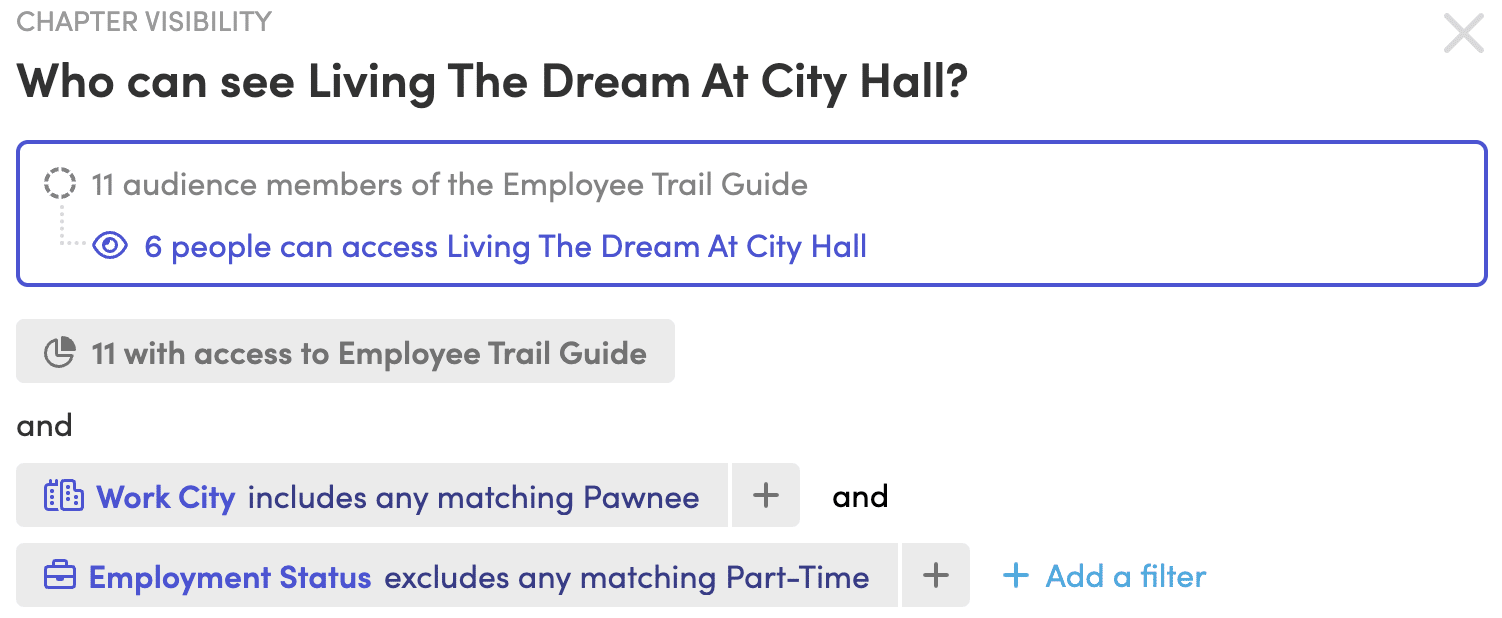
Blissbook expression builder limiting a handbook section to employees based on location and employment status

Communicating What Changed

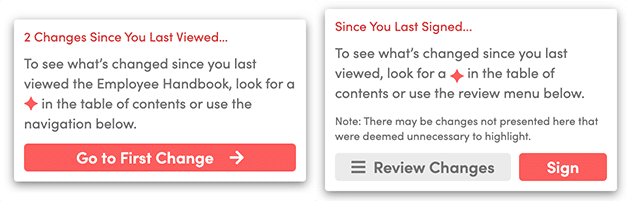
When you update a state-specific addendum, only the employees in that state need to know. Blissbook’s annotations guide employees through the changes that happened since the last time they viewed or signed the handbook. You control what they see, and the rest of your workforce doesn’t get an unnecessary notification.

That specificity matters. An HR coordinator maintaining seven versions of the same handbook for seven states can spend more time distributing updates than writing them. Targeting updates to the right people, automatically, is what turns compliance from a fire drill into a rhythm.

The annotation card an employee sees before signing, summarizing what changed since they last signed.

Tracking Multi-State Sign-Offs and Building an Audit Trail

When someone asks whether employees saw the new California meal break policy, you want a better answer than “we sent an email.”

An audit trail for a multi-state handbook needs to track three things per employee:

  • Which version of which policies (including state-specific addendums) each employee viewed
  • When they acknowledged each version
  • Whether they were shown the correct content for their location at the time of acknowledgement

Paper-based or spreadsheet-based tracking can’t reliably do this across five states, much less fifty. The risk isn’t abstract: in a wage and hour audit, the question “did this employee receive notice of their rights under California law?” requires a concrete, time-stamped answer.

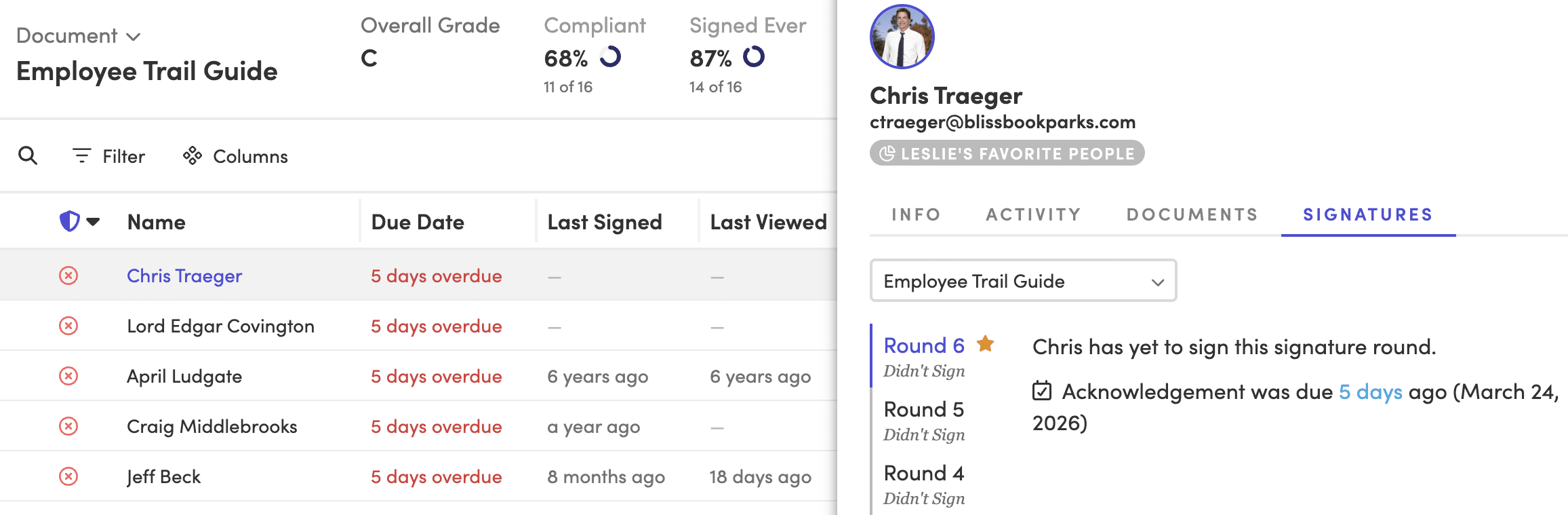
Different combinations of personalized content can add up to hundreds of policy variants. Blissbook’s reporting records the exact variant each employee saw, when they signed, and which version was current at the time.

The employee details panel is another option: it lists "view the exact content they could see when they signed," which backs up the article's claim.

Custom Signature Rounds for State-Level Changes

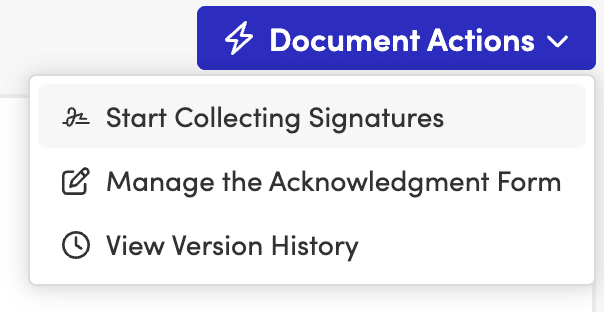
When you update California-only policies, you don’t need every employee across all states to re-sign. You can start a new signature round for only the employees affected by the change. This keeps your acknowledgement rates meaningful: 100% of your California team signed the updated California policies, and your other employees didn’t get a confusing request to sign something that doesn’t apply to them.

Blissbook Document Actions menu with the option to start a new signature round for a handbook

Want to see what that report looks like for your states? Request a Demo

Keeping Your Multi-State Handbook Current

Employment law changes constantly at the federal, state, and local level. The operational challenge isn’t knowing a law changed. It’s acting on it before your handbook falls out of step.

A review process for multi-state handbooks needs three components:

  • A watch list of the states where you have employees and the policy areas most likely to change in each
  • An owner for each state addendum who’s responsible for reviewing changes
  • A cadence (quarterly is common, though states with heavy legislative activity like California may need more frequent reviews)

Blissbook’s Law Change Alerts track changes in federal, state, county, and city laws that may require handbook policy updates.

You can go a step further with the Labor Law Change Updates service, where Blissbook suggests edits to your policies as laws change. All you need to do is review and approve the proposed updates.

That’s the difference between a compliance process that depends on someone remembering to check and one that brings the changes to you.

What to Look for in Employee Handbook Software for Multi-State Compliance

Not every handbook tool handles multi-state complexity. When you’re evaluating employee handbook software for a workforce spread across multiple states, these are the capabilities that matter:

Personalized Content by Location, Entity, and Group

Employees should see only the policies that apply to them. This eliminates the “wrong state” problem and reduces confusion. Look for tools that let you control visibility at the section or policy level, not just the document level.

Version Control with a Full Audit Trail

Every policy change should be tracked: what changed, who published it, when it went live, and who acknowledged it. Version history that shows exact content diffs between versions matters more than a simple “last updated” timestamp.

Blissbook version history comparing two published versions of a policy, with added text in green and deleted text in red

Targeted Acknowledgements and Signature Tracking

You need the ability to run signature rounds for specific audiences (all California employees, for example) without triggering a notification for everyone else. The reporting should show exactly which policies each employee signed and which version was current at the time.

HRIS Integration for Automated Employee Data

When a new hire starts in a state you already cover, their employee record should automatically determine which policies they see. HRIS integrations (Blissbook connects with 80+ HRIS, payroll, and directory platforms) eliminate the manual step of assigning employees to the right state addendum.

Collaborative Editing and Approval Workflows

State addendums often need legal review before publishing. Built-in approval workflows that route updates for review and create a clear audit trail from draft to final reduce the risk of an unapproved policy going live.

Remote Employees and Multi-State Handbook Complications

Remote work multiplied the multi-state problem. One remote hire in a new state can trigger payroll registration, unemployment insurance, and workers’ compensation obligations that your existing handbook doesn’t address.

Your handbook should include a remote work policy that specifies which state’s laws apply to remote employees, particularly for expense reimbursement (California requires reimbursement for necessary work expenses, and that rule follows the employee regardless of where the company is headquartered).

The tricky part: an employee who moves to a new state without telling you can trigger compliance obligations you don’t know about.

Your handbook needs a clear policy requiring employees to notify HR of any change in work location. And your employee handbook software needs to let you reassign that employee’s content instantly when they do.

Common Mistakes in Multi-State Handbook Management

Sounds obvious, but these come up repeatedly:

  • Applying a “highest standard” approach to every policy without analyzing cost impact. Meal break rules and paid leave mandates can get expensive when applied across states that don’t require them.
  • Treating at-will language as universal. Several states limit at-will employment in ways your standard disclaimer doesn’t cover (Montana, for example, requires “good cause” for termination after a probationary period).
  • Failing to update addendums when entering a new state. One new hire in a new state means a new addendum is needed before that employee starts.
  • Sending every employee every policy update, regardless of whether it applies to them. This trains employees to ignore handbook communications.
  • Relying on email attachments or shared drives for distribution. When audit time comes, you need time-stamped proof of exactly which version each employee received and acknowledged.

Sound familiar? Talk to us and we’ll show you how other multi-state teams handle it.

A Multi-State Handbook Is a System

Your handbook has to keep up as your team crosses state lines, as legislatures pass new laws, and as employees move.

The structure stays the same: one core handbook, state-specific addendums for the policies that vary, personalized delivery so employees see only what applies to them, and acknowledgement tracking that holds up to scrutiny.

Blissbook gives you the pieces to run it: personalized content, targeted signature rounds, audit-ready reporting, and Law Change Alerts.

FAQs About Employee Handbook Software for Multi-State HR

Do I need a separate employee handbook for every state?

No. A single core handbook with state-specific addendums is the most practical approach for employers in five or more states. Blissbook’s personalized content features let you keep everything in one handbook while each employee sees only the policies relevant to their state.

What state laws cause the most multi-state handbook conflicts?

PTO payout requirements, paid sick and family leave mandates, meal and rest break rules, and final paycheck timing are the most common sources of conflict. California, New York, and Illinois impose requirements that frequently differ from federal baselines and from each other.

How do I track which employees signed which state-specific policies?

Blissbook automatically tracks the exact content each employee viewed when they signed their acknowledgement. Reporting shows which version of which policies (including state addendums) each employee signed, creating an audit trail that answers the question “did this employee receive notice of their rights?”

Can I send policy updates to only the employees in a specific state?

Yes. Blissbook lets you start a new signature round for only the employees affected by a state-specific change. Your California team signs the updated California policies, and employees in other states aren’t sent an unnecessary notification about a change that doesn’t apply to them.

What happens when a remote employee moves to a new state?

A remote employee who relocates can trigger new compliance obligations including payroll registration, unemployment insurance, and updated handbook policies. Your handbook should require employees to notify HR of location changes. With Blissbook’s HRIS integrations, you can reassign that employee to the correct state addendums as soon as their record updates.

How often should I review my multi-state handbook?

A quarterly review cycle works for most organizations, with more frequent checks for states with heavy legislative activity like California. Blissbook’s Law Change Alerts notify you of federal, state, county, and city law changes that may require handbook updates, so you’re not relying on someone remembering to check.

How to Stay Up to Date With Changing Labor Laws

US labor laws change dozens to hundreds of times a year at the federal, state, and local level. If tracking those changes is part of your job, it can feel like the whole job. A rule changes in one state, a notice requirement shifts in another city, and suddenly the policies your team relied on last quarter are out of date.

Miss one update and you’ve got a handbook that no longer matches the law, plus legal risk nobody agreed to take on. And knowing a law changed is the easy part. You still have to figure out whether it applies to your organization and what needs to happen next.

Employee reviewing labor laws in an employee handbook
Photo by Yan Krukau on Pexels

The good news: staying up to date doesn’t have to mean constant Googling and checking government websites whenever someone has a spare minute. What you need is a system: a few sources you trust, a repeatable process for acting on changes, and tools that take the busywork off your plate. Here’s how to build it.

10 Signs Employees Haven’t Read the Employee Handbook (and What to Do About It)

You did the work. You reviewed policies, aligned with legal, cleaned up outdated language, maybe even refreshed the design. You rolled out the updated employee handbook with a clear announcement. Everyone acknowledged it. Well, almost everyone.

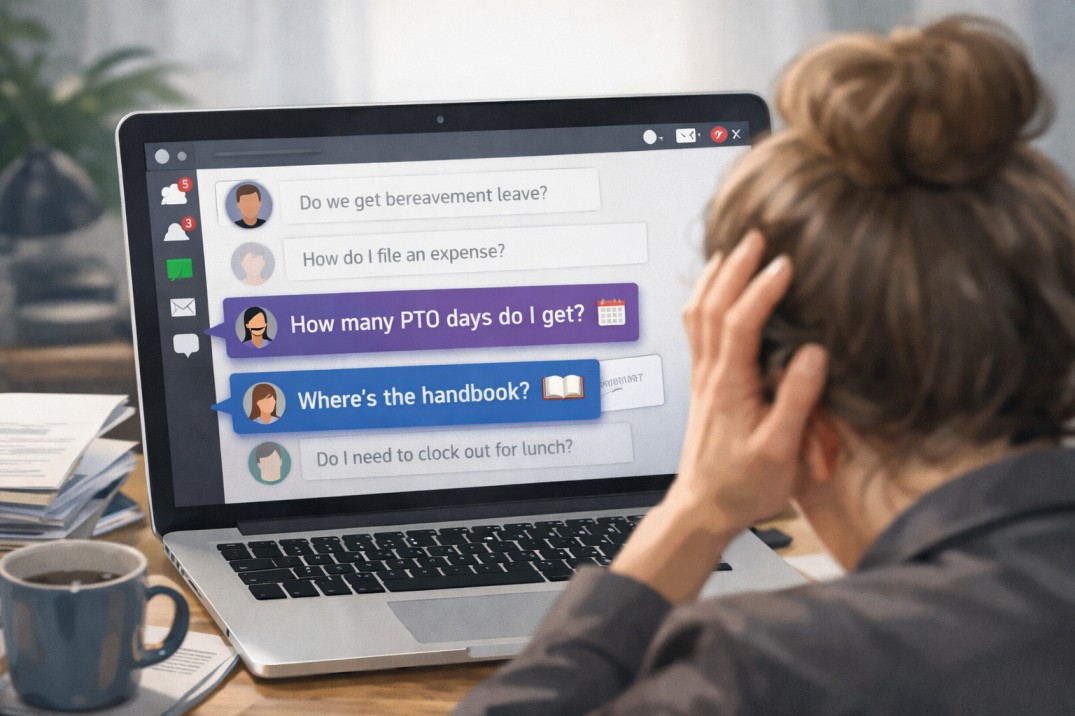
HR manager overwhelmed by employee questions about PTO, expenses, and the employee handbook

And then the questions started:

  • “Wait, how many PTO days do we get?”
  • “Are we allowed to work remotely on Fridays?”
  • “That was a policy? I didn’t know that.”

If that feels familiar, you’re not alone. Many HR teams pour serious time and effort into creating thoughtful, compliant handbooks, only to discover that employees aren’t actually using them. When employees aren’t reading the handbook, the issue isn’t laziness or resistance, it’s friction.

Maybe the document is hard to access. Maybe it feels overwhelming. Maybe it’s technically accurate but not especially engaging. Whatever the cause, low employee handbook engagement creates real risk. Confusion leads to inconsistent decisions, which can snowball into handbook compliance issues that cost time, money, and trust.

Let’s take a look at 10 clear signs your employees haven’t read your handbook, along with practical fixes for each one.

Adversarial HR Policies Are Costing You More Than You Think

Most employee handbooks aren’t openly hostile, but many aren’t especially welcoming either.

They’re often packed with legal language, rigid phrasing, and worst-case assumptions about employee behavior. Usually, that language comes from a well-meaning place: copy-pasted statute text, borrowed law firm templates, or attempts to “lock things down” just in case. Other times, it’s simply inertia.

The result is what we’d call adversarial HR policies.

You see it in phrases like “will result in discipline,” “the Company reserves the right,” or “failure to comply may lead to termination.” The tone is transactional and one-sided. HR appears mainly as an enforcement mechanism, not as a guide or partner. This approach can feel safer and more compliant, but in practice it creates distance where clarity was the goal.

Policy language does more than describe rules. It shapes how people respond when something goes wrong. When policies read like contracts instead of explanations, employees are more likely to approach issues defensively or escalate quickly. Managers, meanwhile, may feel boxed in, applying rules mechanically instead of using judgment the law often allows.

Those dynamics carry real costs. Trust erodes. Small issues harden into formal disputes. HR spends more time policing than problem-solving. And while adversarial policies can reduce certain risks, they can also invite others by priming people to treat disagreements as legal problems instead of human ones.

Fixing this doesn’t require sacrificing compliance. It requires translating the law into clear, human language, explaining both employee rights and employer expectations, and writing policies that portray HR teammates as trusted guides who help employees and managers navigate complex compliance terrain.

6 Reasons That Gorgeous PDF Handbook Is Putting Your Company at Risk

Your beautiful, branded, and intentionally “fun” PDF handbook project started with the right goals. For many teams, it’s a meaningful upgrade from the staid, legalese handbook employees barely touched. The content feels more human, the design reflects company culture, and the format is familiar. Teams choose PDFs because they know how they work and because a well-designed one genuinely feels more likely to be read (and a heck of a lot more fun to make).

The problem is what happens after that PDF is distributed. From that moment on, the content is frozen. Policies need ongoing updates as laws change, internal practices evolve, and expectations shift. A static file can’t keep up, and neither can a workflow that requires routing changes through a design team. Each update becomes a multi-step process, which encourages teams to delay changes so they can batch them together. In the meantime, employees are referencing information that’s already out of date.

This article breaks down the risks that come with relying on that beautiful PDF handbook with a custom layout, regardless of how polished or engaging it looks. You’ll see how this approach introduces friction, limits visibility, and increases compliance risk. Additionally, you’ll learn how modern HR teams are moving to a more flexible way of managing and sharing their policies (while keeping it on-brand and engaging).

How Smart HR Teams Approach 100% Signature Compliance Without Nagging Employees

Every HR team knows the routine. You send out a new policy, then spend the next few weeks chasing signatures, sending reminders, and feeling like the “policy police.” It’s necessary work, but it’s not exactly the part of the job anyone looks forward to.

The good news? There’s a smarter way. Modern HR teams are using digital tools and thoughtful design to achieve policy compliance automatically. The right approach turns compliance from a manual task into a seamless process that runs in the background, freeing HR to focus on people instead of paperwork.
In this article, we’ll look at seven practical ways to achieve policy compliance without the constant hassle or nagging. From making policies accessible and personalized, to automating reminders and involving managers, you’ll see how the smartest HR teams get it done.

4 Signs Your Policies Aren’t Personalized Enough (And Why It Matters)

Writing employee policies often feels like a tug-of-war. On one side, HR wants efficiency: one master document that’s simple to update and share. On the other, employees want clarity: a streamlined handbook that only shows them the policies relevant to their role, location, or situation. What makes life easier for admins often makes life harder for employees, and vice versa.

Traditional tools don’t make this any easier. You either end up with a single, bloated doc stuffed with every possible policy, or you’re juggling multiple versions to accommodate different employee groups. Neither option really works. One leaves employees unsure of what applies to them, and the other creates chaos for HR; managing duplicate updates, trying to keep track of which file or folder employees should use, and dealing with the inevitable human error that comes from version sprawl.

But the old trade-off isn’t necessary anymore. Modern handbook software bridges the gap, delivering the personalization employees need without creating version-control chaos for HR. With Blissbook, you can manage a single source of truth for each policy, then deliver personalized, up-to-date handbooks that make sense for every employee. Everyone gets what they need, and nobody gets lost in the shuffle.

How to Create an Employee Handbook Using Google Docs

To create an employee handbook in Google Docs, start from a template, add each policy as a clearly titled section, then share it with view-only access. Below is the full step-by-step, plus when to move to dedicated software.

If your team is creating its first employee handbook, chances are you’ll start in a tool you already use every day. For many small or growing companies, that’s Google Docs. It’s free, familiar, and makes it easy to collaborate with managers or legal advisors without introducing new software. In those early stages, using Docs can feel like the simplest way to get your handbook project off the ground.

But here’s the catch: what works well for drafting and collecting input can quickly become clunky once your handbook needs to scale. Formatting gets messy, version control becomes confusing, and distributing a document to hundreds of employees isn’t as straightforward as hitting “share.”

We’re here to help. Let’s walk through the step-by-step process of creating an employee handbook in Google Docs, explore best practices to keep it professional and readable, and talk about when it makes sense to move beyond Docs into a more scalable, secure solution.