Blissbook Bugle #1

·Updated

We’re finally getting around to launching our weekly newsletter and since the info we’re blasting out every week is so valuable, we thought we’d post it on the ol’ blogaroo as well. We’ll be back every Friday with the best HR and policy management content we can find to help you become a better HR pro, leader, and person. Without further adieu…

TGIF, am I right?! You made it through the week and to commemorate your accomplishment, we’ve gathered the best HR and policy management resources for your reading pleasure. Enjoy and have a great weekend!

✦ ✦ ✦

Article of the Week: We love our first ever A.O.T.W. (look for the ✦ below) because it highlights just how important language is. Language exists just as much to influence as it does to communicate. How are you influencing the people you communicate with? On that note…

Which of this week’s articles do you think is the most useful?

Blissbook’s New Payments System

·Updated

Since Blissbook was relaunched at the end of 2015, we’ve grown a lot. The ability to scale is taking on new importance for us, and we know it’s important to you.

Most HR software charges by the person. You try to figure out how many seats you need up front, you buy that much, and then you’re charged regardless of how many people are actually using it. Usually you’ll buy more than you need so you don’t have to add a seat every time you hire somebody. That means you end up paying for people who aren’t using the software or you micromanage your account to keep from being overcharged. Seems like a pain in the caboose or, at the very least, unfair.

Better Video Support

·Updated

Greetings from Atlanta with another update to the Blissbook platform! The month of October has the best weather here in Atlanta. For one whole month, we get to experience the weather southern Californians have all year long. On to the updates…

YouTube Video Support

You can now embed YouTube videos throughout the custom sections of your handbook. Need some video training for a policy? Or do you have a fun video explainer or some other demonstration? Now you can post that thing right next to the content. And since we know you’ll ask, support for Vimeo is coming soon!

BambooHR Groups

For our customers using the BambooHR integration, you can now define groups for your employees by Location, Division, or Department. This allows you to use the variable content feature in conjunction with your BambooHR integration. It also enables sharing by groups (or signature rounds).

Other Updates

We fixed a number of rare bugs and errors that should improve the stability and speed of Blissbook. There are also a few other upgrades:

  • Set who your notifications emails come from on your emails settings page (Click your company name in the top right, then Emails, then Settings).
  • Using our FTP file sync? You can see if there’s an issue with the sync on your People page. Just hover over the “Last updated” text.
  • If you’re a new customer who has recently asked your employees to sign acknowledgements (outside of Blissbook), and you don’t want to ask them again, you can set your signature round to only ask new employees.
  • Filter your lists of people by ID (if you’re including that in a CSV upload or file sync)

We love hearing from you, our customers. If you have any feature requests, bug reports, or if there’s anything else you’d like to see us tackle – please let us know! You can email us or click the ? in the top right corner of your Blissbook account to send us a support message.

Until next time!

Multiple Signatures and Handbook Grades

·Updated

Keeping your company protected doesn’t end on an employee’s first day. Over time, laws, regulations, and best-practices change and your handbook changes right alongside. We recently made it easy to keep employees informed of those changes but sometimes the changes are so big that you want to collect new signatures. Or maybe you added your code of conduct to make it easy to keep updated, and that code gets signed off every year. We’ve heard from you that these are very real situations and our latest update addresses them.

This also forced a change to the documentation center. The new documentation center’s purpose is to communicate the following, clearly and efficiently, on your behalf: Am I current? Am I doing everything I can to keep the company protected? If not, where (or who) are the risks?

Employee Handbook Documentation Dashboard


Every employee now has a risk rating, and all those ratings contribute to an overall risk mitigation grade. If everyone has signed the latest signature round, you get an A+. If employees haven’t signed, you get points when you’ve made sure they know about the handbook and when they view it.

Look for the dashboard to get improved and tweaked over time!

Creating an Information and Data Security Policy

·Updated

The importance of safeguarding your company’s and your company’s customers’ data is obvious. Since I wrote about data breaches a year ago in regards to how to place a security freeze to prevent identity theft, the list of prominent organizations who’ve suffered from data breaches is long. Disney, Hillary Clinton’s campaign, the Democratic National Committee, the University of Connecticut, hotel(s)… the list goes on – and that’s just in the last 45 days!

Your company can reduce the risk of a data breach by having strong data safeguards in place. A great way to disseminate these data safeguards with an Information and Data Security Policy in your employee handbook. This article covers an overview of all the different information that you may want to include in your data security policy, which is essential for protecting sensitive data.

Passwords

Most data breaches do not happen as depicted in the movies. They typically start with access to one person’s account via social engineering and spread from there. That’s why it’s important that every employee puts in the effort to keep their accounts secure.

Your IT staff should decide how passwords are created, stored, shared, and communicated. Many companies use services like 1Password, Dashlane, or LastPass to accomplish these tasks. If you do use those services, make sure employees know how to set them up and use them.

Other Secret Information

Provide guidance on how employees can securely communicate sensitive information, such as credit card numbers, social security numbers, license keys, and so on. This information should never be written down on paper that can be misplaced or stolen, and it should not be recorded in any software that stores it forever (like email).

IT Infrastructure

There are many things to consider for how to handle security for your IT infrastructure. Your IT staff will likely have a list of things to communicate. In general, here’s what should be covered.

General Info

How to use IT infrastructure. You probably want to mention things like:

  • No malevolent hacking.
  • No illegal activity.
  • Keep confidential information safe.
  • Respect copyright laws.
  • Keep your web browsing PG-13.

Privacy

Be clear that your company owns all IT infrastructure (hardware and software) distributed to employees and that you have the right to access and/or monitor it at any time.

Personal Use

Most company devices are used for some amount of non-work related activity. Employees should be informed of any requirements around this use. If there’s a lot to say, consider creating a separate “Communication Systems and Acceptable Use” policy. Stand-alone BYOD (Bring Your Own Device) policies are fairly common nowadays as well.

Operational Security

If your company, like ours, stores confidential information on software or hardware you’ve created, you should outline how that data is secured. Describe rules/guidelines around:

  • Password management for your servers and databases
  • Software updates (how and when)
  • Database backups
  • Application security best practices
  • API keys
  • Access control to the databases, code, servers, and physical hardware
  • How activity is logged and who can access that data
  • Intrusion detection

Network Security

Tell employees about a VPN, the company’s WiFi, or any requirements when using public WiFi.

—-

That about wraps it up. A good Data Security Policy will go a long way towards helping your employees keep confidential information secure. Every employee handbook should have one! For that reason, we’ve added a basic one to the starter handbook that every new Blissbook customer gets when they sign up.

If you want to see a specific example policy, take a look at our Information and Data Security Policy, which serves as a practical example of an effective data security policy.

Summer Enhancements: Key Updates

·Updated

As we embrace the warm days of summer, we are excited to announce a series of important updates to Blissbook. These enhancements not only streamline access to our resources but also improve overall user experience. With features like access to historical handbook versions and clear publication details, we continue to prioritize organizational efficiency and transparency. Stay tuned for additional improvements, including the upcoming implementation of multiple signature rounds.

Changed Your Handbook? Tell Everyone!

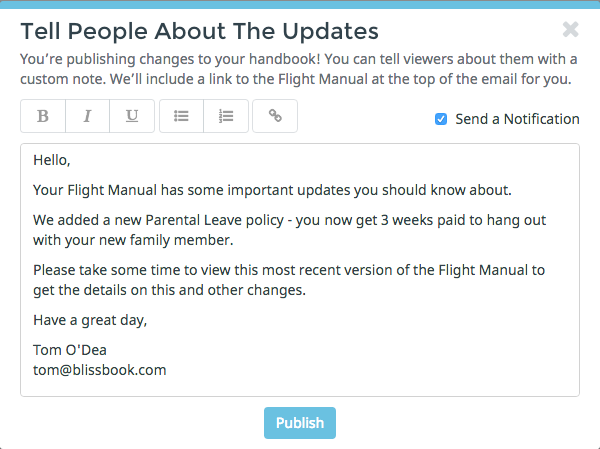
Handbook Changes Modal

When you publish updates to your handbook, you’ll now see the above modal. If you choose to send a notification, we’ll email everyone with access to your handbook whatever note you enter in. And because we know you always want to look good, you can now…

Customize All Notifications

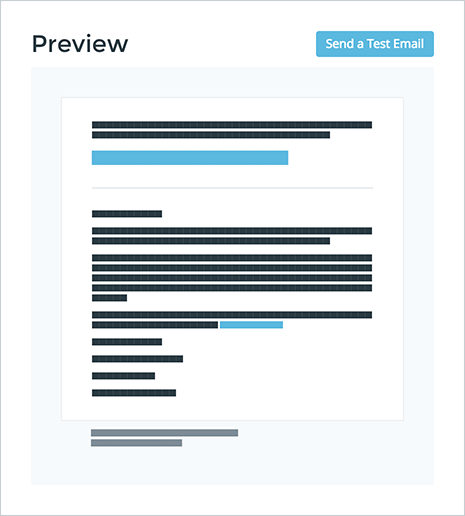
We’re talking text, colors, font, who they’re from, hair color. OK, we made one of those up.

Email Branding Preview

All of this can be accomplished on the new “Emails” tab within your Organization. Click your company name in the top right to find this tab.

Major Minor Changes

·Updated

This week we released some exciting changes to the Blissbook platform. Although many of the changes are under the surface, there are a couple of new features that you can take advantage of right now.

Documentation Center

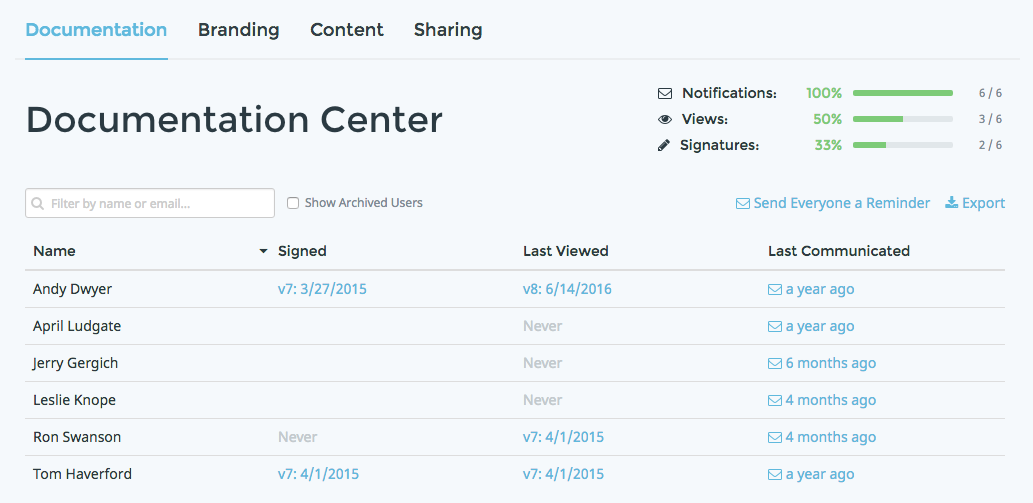
The main update is the conversion of the Dashboard page to the Document Center. The Documentation Center puts all the documentation you would ever need for an employee in one place, easily accessible and printable with just a couple clicks.

doc-center-screenshot

You’ll notice a new column: Communications! Blissbook now keeps track of all the communications you’ve sent to your users.

You can click any of the dates within these columns to see a detailed report for any user. You can even print that report to a PDF.

Users Tracked By ID

In order to implement this change, we changed the way Blissbook keeps track of users. It’s now done by ID, rather than email address. That means you can now change someone’s email address and we’ll track them as the same person and keep their documentation in order.

It also means we can handle archived users much better. You now have self-serve access to reporting for archived users.

These two changes set us up for some big improvements this summer. Custom notifications! Repeat signatures! Self-service to old versions of your handbook! We’re also working on increased video support and a new editor to make customizing your handbook even easier.

Other Changes

  • Support for two new SSO options: Office 365 and Okta. If your company uses either of these services, you can enable them on your Integrations tab to make it easy for users to sign in to their Blissbook.
  • Searching your published handbook is better – you can now see what chapter or section text belongs to within the search results.
  • Using our variable content feature? You should now see tags for the sections or chapters for which it’s enabled. You no longer need to open the access control modal to see what your settings are.
  • Is Blissbook down? Probably not… our uptime is over 99.9%. See for yourself on our new status page: https://status.blissbook.com
  • Lots of minor bug fixes and upgrades to the Blissbook technology.

We’re looking forward to a fun summer here at Blissbook. Stay cool out there!

cool

How To Record Company Values

·Updated

Your company values. Of course they’re important. And it’s easy to throw them into a list that can be used in many places. On the back of an ID card. Painted on a wall. In your email signature. You get the idea. But as Netflix points out in their culture deck, actual values are not just words you show in a lobby. Your actual values are shown by how you hire, reward and release people.

If you want everyone who makes those decisions at your company to make them correctly – i.e. based on your values – they must truly understand what those values are and, more importantly, what they mean. That requires more than just a list.

Creating this type of training content can be difficult. With that in mind, here’s an excerpt from our upcoming e-book entitled “How to Make a Culture-First Employee Handbook” that might give you the helping hand you need to turn your values content into more than just a list.

Company Values

Every company has core values, whether they’re written down or not. To make them more than just nice-sounding words, everyone at your company must live them unconditionally every day.

Before any decision is final, employees should ask, “Is it in line with our values?”

Core values are the behaviors, skills and attributes that employees value in all people. They define who you and your employees are deep down inside. Each value must be universally beneficial: something you think everyone should hold in high regard; not just those within your company (yes, even competitors).

Tips:

The format of your values should be an adjective for a person. You can think of values as virtues. Most companies have 3 to 10 core values.

You may want to go into detail about each value to make sure employees know what you mean. If you’re having trouble thinking of some good details, try answering some of these questions:

  • What actions demonstrate this value, in general? You can write these out as: You do / make / think / identify / recognize / understand, etc. …
  • Why is this a value? What is its intent?
  • What are some specific examples of how someone can demonstrate this value?
  • If someone asked what the value means, is there an easy answer? Why is it a good answer?
  • What other adjectives would you use to describe a person with this value?
  • Is this value a new idea of how to live your life? What’s the old way and why is this way better?
  • Are there any exceptions to this value?
  • Are there any famous quotes that express this value?

Bonus!

A generous and thoughtful Blissbook customer saw the values help text inside of Blissbook while they were creating their employee handbook and were inspired to send a list of dozens of example values. We thought it’d be valuable to pass on so click that link if you’re interested. And if you’re in need of a therapist in DC please talk to our friends at Therapy Group of DC!

Employee Handbook Access Should Be Easy

·Updated

This is a long one, so let’s get right to it.

Signing in to Blissbook has been a pain in the butt for our non-SSO (Single Sign-On) users for a long time. It’s been a pain because Blissbook is password-based and… get ready… we never ask users to create a password. Users get a link in their invitation email that signs them in to their Blissbook automatically. However, if they ever sign out or use a different browser, they can’t access their Blissbook without a password. The workaround is to tell Blissbook you forgot your password and the system emails you a link to set up a new one.

We want to make it easy to access Blissbook. If your company’s policies are hard to access, they aren’t protecting your company. That’s bad!

There are 3 basic options for a computer system to confirm a user’s identity:

  1. The user and computer system know the same secret, such as a password, PIN, etc. Ideally, this secret is impossible for others to guess.
  2. The user has a physical object in their possession that verifies their identity to the system, such as a key, a bank card, a phone/computer/key fob with a secret token, etc.
  3. The system knows a physical characteristic of the user, such as a fingerprint, eye iris, voice, etc. This is known as biometrics.

Blissbook has traditionally used option #1. We’re switching to #2.

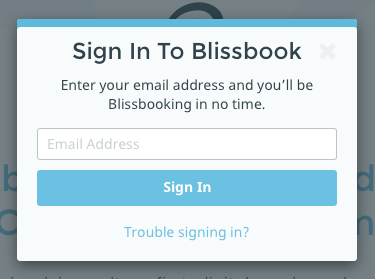
sign-in

When a user tries to sign in to Blissbook, they’ll enter their email address. If that email address is in Blissbook, we’ll know who they are and what organization they belong to.

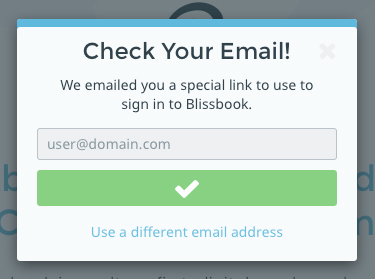
sign-in-email-sent

They’ll then get an email with a special link that they’ll click to sign in to Blissbook. Users will remain signed in for 60 days unless they explicitly sign out or switch web browsers.

This means your employees never have to create or remember a password to access their employee handbook. They just need access to their email account!

More Updates!

·Updated

Happy Spring, faithful Blissbook reader! It’s already in the 70s here in Atlanta as we celebrate our latest release of goodies. This update touches both parts of our tagline: protect your company and show employees you care.

Search and a Table of Contents

search

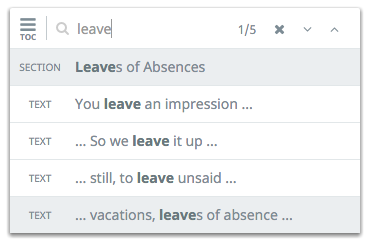
Published handbooks got a big upgrade a few weeks ago with a new table of contents that includes links to all of your policies, not just the major chapters. We also added search, so handbook readers can easily find anything they’re looking for, whether it’s in a hidden section (the Nitty Gritty) or not. Just one more thing to help make sure you never hear “I couldn’t find the policy” ever again.

Better Branding

Part of showing employees you care is presenting information to them with the same amount of effort and attention that your company puts in to presenting information to customers. We’ve got 2 updates to help you do that.

You can now upload a custom favicon (the little icons in your browser tabs) so everything about your Blissbook can be “on-brand”.

A lot of our customers like the ability to add images to their “guiding principles” section (or whatever they’ve turned that section into). Since the core values section is basically the same format, we thought our users might like to add images there as well. Now you can! Check out the Rocket Whale Blissbook to see it in action.

Easy Sign In

This one is a doozie. We changed the way signing in to Blissbook works, so that our users’ employees don’t have to create or remember a password. This one deserves a longer explanation – read that here.