The three most important employee handbook software features are version control, location-based policy management, and acknowledgment tracking. They come first because they keep policy content accurate, show each employee the rules that apply to them, and document who received, viewed, and signed each version.
Someone updates the PTO policy, then asks which version is current. The answer depends on which document, shared drive, or local file they opened.
At 50 employees, that confusion is manageable. As headcount, locations, and policy owners increase, it gets harder to check by hand. The right software reduces that uncertainty while leaving policy decisions with HR.
1. Can You Edit Policies and See Exactly What Changed?
Every other feature depends on employees reading the current policy, which makes version control the foundation.
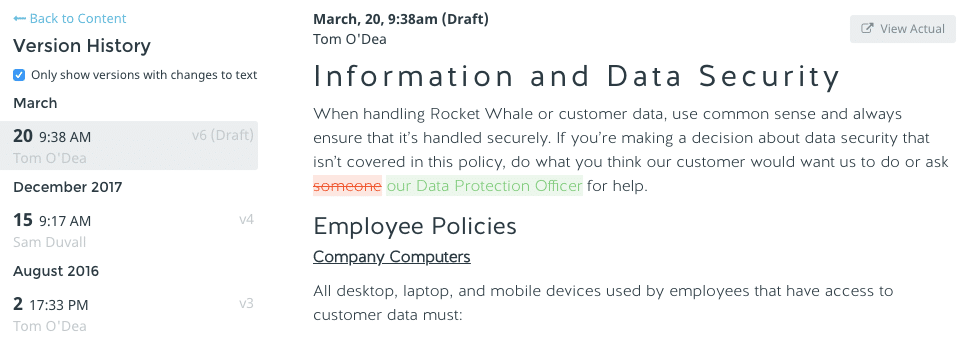
A useful platform lets your team edit policies in one place, review proposed changes, and see the history behind each published version: what changed, when, and who changed it.
That record matters once several people contribute. HR may own the process, while legal, finance, or department leaders review individual policies. Without a clear history, basic questions get hard to answer:
Which version did we publish?
Who reviewed it?
What language changed?
Which employees signed after the update?
Section-level and document-level version history should make additions, deletions, and formatting changes easy to spot, and side-by-side comparisons help when a policy has changed more than once. A central policy library adds one more benefit: when the same policy appears in several handbooks, you edit it once and publish the change everywhere it appears.
The practical test: ask a vendor to show you how to compare two published versions of the same policy. If the answer involves exporting files or checking multiple folders, the feature won’t hold up as your team grows.
2. Can the Handbook Handle Multiple States and Locations?
Once you hire in a second state, one set of rules stops covering everyone.
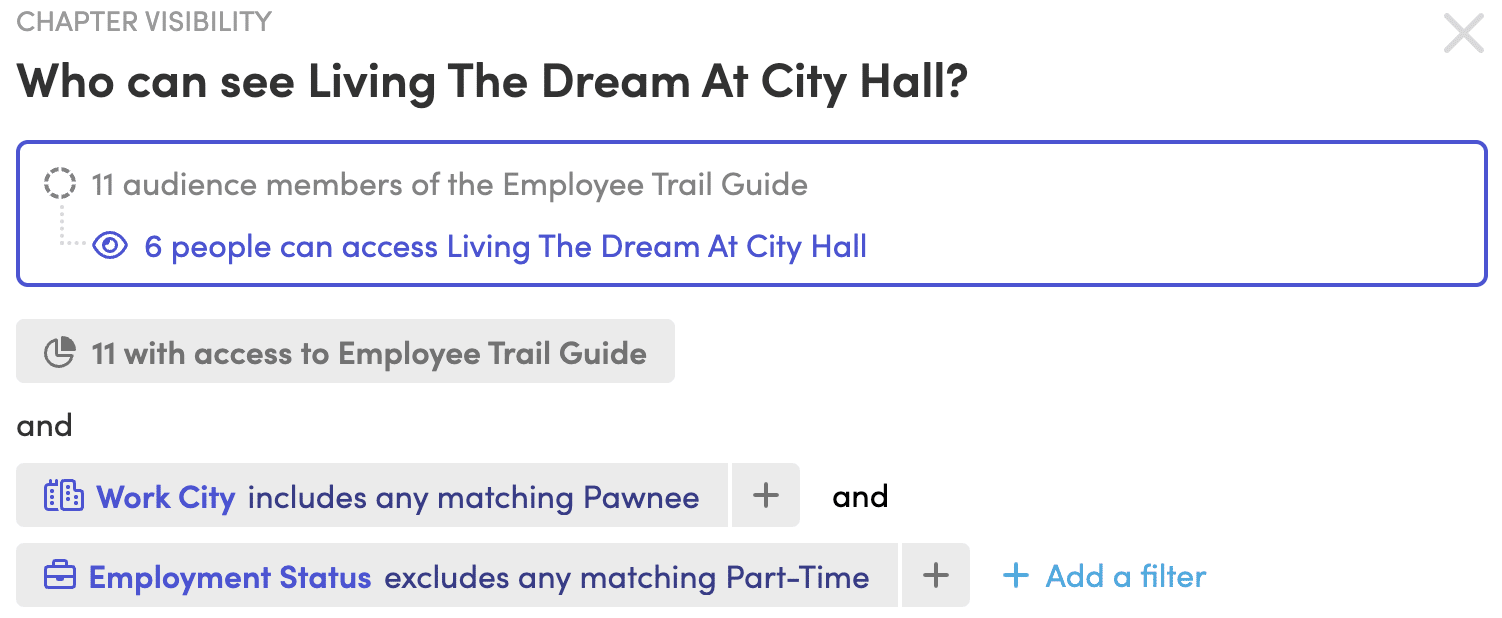
Some policies apply to all employees. Others depend on where someone works, which entity employs them, or how they’re classified. Software should let you manage those differences from one shared structure, showing a chapter, section, policy, or single paragraph only to the employees it applies to, based on fields like work location, state, employment status, or entity.
That keeps you from maintaining separate handbooks with repeated content, and employees don’t have to sort through rules that don’t apply to them. If you’re still deciding how to structure a multi-state handbook, settle that first.
Acknowledgments should follow the same logic. If employees in different locations see different content, each acknowledgment should reflect what that employee was shown. Before publishing, administrators should be able to preview the handbook as a specific employee.
Labor law updates belong in this evaluation too. A service that tracks policy-impacting changes across city, county, state, and federal jurisdictions gives HR a clear starting point when a policy needs review, and some services also suggest edits to your existing policy language. Software doesn’t replace legal review, though. Have qualified counsel review policy language and proposed changes before you publish.
Sending a policy proves it left your outbox, not that anyone read or signed it.
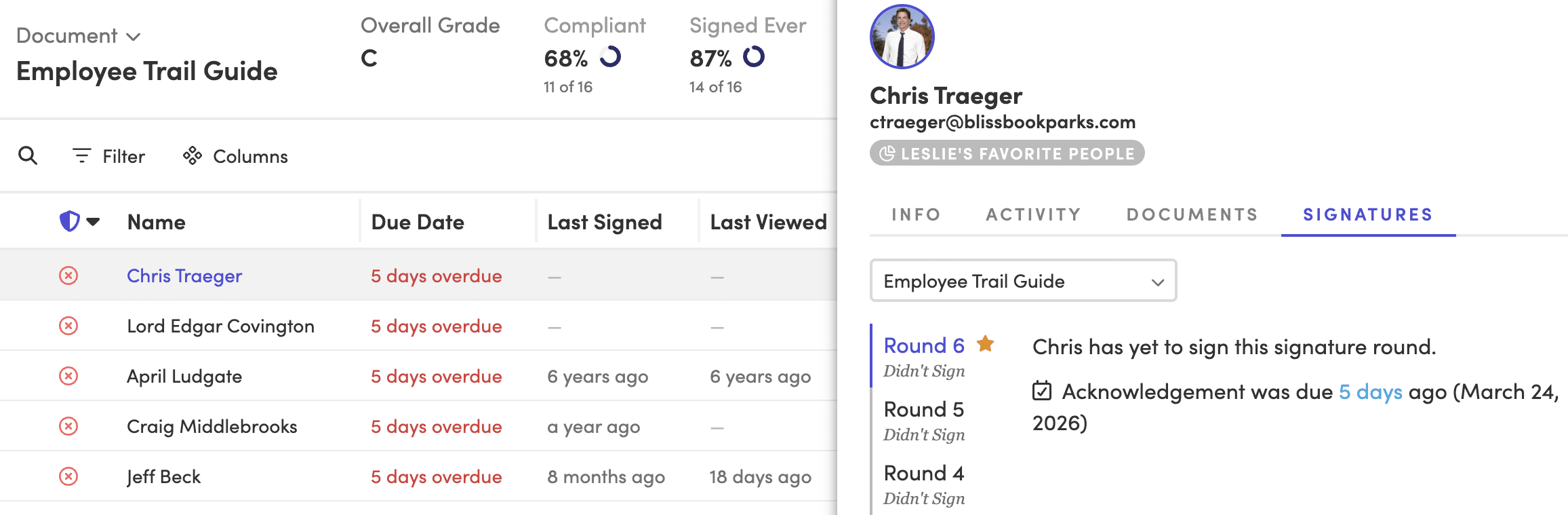
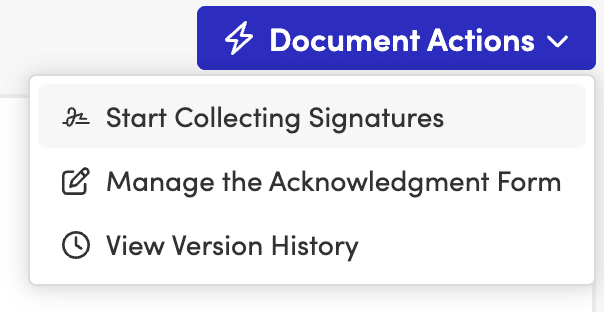
As the team grows, following up one person at a time stops working. A strong platform lets HR request electronic signatures, start a new signature round after a major update for everyone or only the affected employees, and see who still needs to sign.
Reminders should do most of the chasing. Look for control over reminder timing and wording, plus the option to copy managers. Bringing managers in helps when specific teams fall behind.
The record behind the signature matters as much as the signature. The platform should keep the exact content each employee could see when they signed. When personalized content means people received different versions of a policy, that record is what lets HR answer questions later.
4. Does It Connect to Your HRIS?
Every hire, departure, and manager change alters who should see your handbook.
When HR maintains the handbook audience by hand, the list drifts. A new hire gets missed. A former employee stays in a report. A manager change never reaches the person responsible for follow-up.
An integration with your HRIS, payroll system, or directory closes that gap. Check which fields it can use, such as work location, employment type, job title, and manager, because those same fields can drive personalized content, reporting filters, and manager follow-up. Also ask how often it syncs. Blissbook, for example, syncs with 80+ HRIS, payroll, and directory platforms once a day, adding new hires and removing people who have left.
A long integration list matters less than the right connection. Confirm the software supports your system and the employee fields your handbook process depends on.
5. Can Employees Find Answers on Their Phones?
Policy questions come up mid-shift, between meetings, or away from a desk, so the handbook has to work where the question starts.
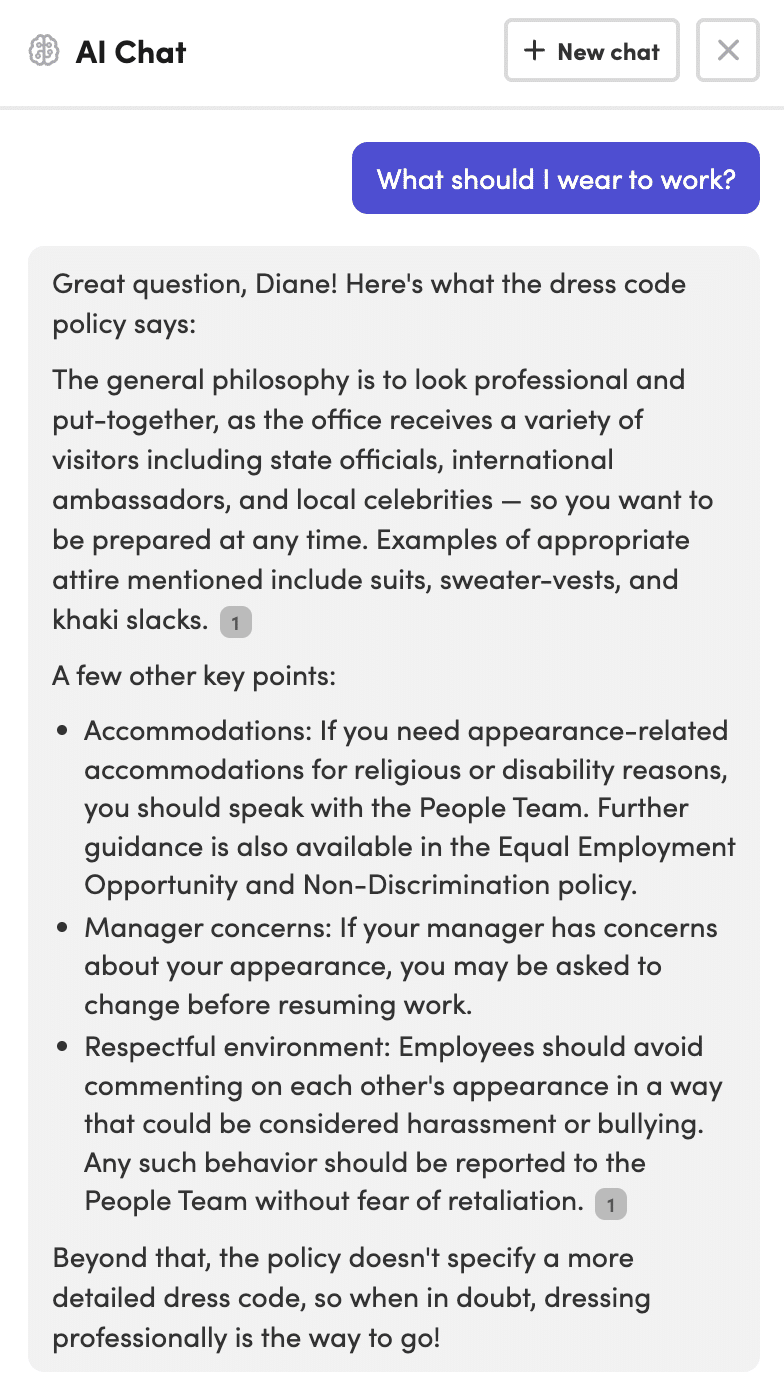
A digital handbook should open in a mobile browser without a file download, stay readable without zooming, and let employees search using the words they’d naturally type, like “time off” rather than the exact policy title. For HR, the same search should make it easy to find related policies and avoid creating duplicates.
If part of your workforce is deskless, seasonal, or shares devices, check how people without a work email sign in. Depending on the platform, options may include single sign-on, kiosk access, or employee ID verification.
Then run a quick test: give someone a common question, a phone, and no help. If they can’t find the answer, your employees won’t either.
6. Can You Report on Views, Signatures, and Policy History?
A final signature count tells you how many people signed. It doesn’t tell you where the process stalled.
Reporting should separate employees who were notified, who viewed the document, and who signed it. As you grow, filters become essential:
Group or location
Manager
Hire date
Signature status
Former (archived) employees
Export options help when HR needs to share a report or document a specific record. Reports should also show the exact content an employee saw when they signed, which matters most when your handbook uses personalized content.
A report for one document shows whether a rollout is working. A report across all documents shows the broader gaps, without combining spreadsheets by hand.
7. Can It Scale Beyond the First Handbook?
Scalable software absorbs new locations, entities, reviewers, and documents without making HR rebuild the process each time.
The daily work shifts as you grow. More people review content, more groups need different policies, and administration (former employees, manager changes, repeat signature rounds, shared policies across documents) often creates more work than the original launch.
The best test is to describe your next stage of growth and ask the vendor to walk through it: add a new location, assign a new policy reviewer, update a shared policy, and request fresh acknowledgments from only the affected employees. A repeatable process is a good sign. A series of manual workarounds is exactly what you’re trying to leave behind.
Want to walk through your next stage of growth with a real example? Request a Demo.
Employee Handbook Software Comparison Checklist
Can HR compare published versions and see who changed each policy?
Can one policy appear in multiple documents and update from a central source?
Can employees see content based on location, state, entity, or employment status?
Can the platform launch new signature rounds and automate reminders?
Can it preserve the exact content each employee saw when signing?
Does it connect to your HRIS, payroll system, or directory?
Can employees access and search the handbook from mobile devices?
Can HR filter and export reports by employee, manager, group, and status?
What Is the Most Important Feature in Employee Handbook Software?
Version control is usually the most important feature because it gives HR a reliable record of current and past policy content. Without it, signatures and reports may point back to a version that is difficult to verify.
Does Employee Handbook Software Replace Legal Review?
No. Employee handbook software helps organize, publish, update, and track policies, but legal review is still needed for policy language and jurisdiction-specific requirements.
Should Employee Handbook Software Include HRIS Integrations?
Yes, if you want employee access, personalized content, and reporting to reflect current employee data. Check whether the integration supports the fields your handbook process uses, including location, employment status, and manager.
Do Smaller Companies Need All of These Features?
Not on day one. A company in one state with few policy changes can start with version control and acknowledgment tracking. Personalized content and HRIS sync become more valuable once you add locations, entities, or frequent hiring.
Choose the platform that keeps policy content accurate as your company grows and keeps the employee side easy to follow.
You just hired your first employee in California. Now your PTO payout policy, which was perfectly legal in Texas, is a liability on the West Coast. Your meal break language doesn’t match what California requires. And your at-will disclaimer needs a state-specific carve-out you didn’t know existed.
One remote hire in a new state, and you’ve picked up a whole new set of rules your current handbook doesn’t cover. Multiply that by five, ten, twenty states, and the question shifts from “do we need to update?” to “how do we keep this from becoming a full-time job?”
The good news: multi-state handbook compliance doesn’t require separate handbooks for every state. It requires a clear core structure, smart addendums, and employee handbook software that makes location-based differences invisible to the people who don’t need to see them.
Key Takeaways: Employee Handbook Software for Multi-State HR
A single core handbook paired with state-specific addendums covers most multi-state scenarios without duplicating work.
Conflicting state laws on PTO payouts, paid leave, and meal breaks are the most common sources of handbook liability.
Personalized content delivery means employees only see the policies that apply to their location and role.
Blissbook’s personalized content features eliminate the need for separate handbook versions per state.
Tracking acknowledgements by state and policy version is what makes your handbook audit-ready, not just compliant.
Why Multi-State Handbooks Break Down
Most handbook problems aren’t about writing bad policies. They’re about writing one policy that can’t bend across state lines.
Federal law (the FLSA, Title VII, FMLA, ADA) sets the floor. States are free to require more, and many do. California’s paid sick leave rules, New York’s pay transparency requirements, and Illinois’ biometric privacy law each impose obligations your federal-only handbook doesn’t address.
If your handbook covers employees in more than one state, the question is always: which state’s version of the rule controls? And the answer is always: the state where the employee works. That’s the mechanism that turns a simple policy update into a multi-threaded project.
Core Handbook vs. State-Specific Addendums: When to Split
There are three common approaches to structuring a multi-state handbook. Each makes different trade-offs between simplicity and precision.
The Universal Handbook with Addendums
A single master document covers company-wide policies at or above the most protective federal standard. State-specific supplements are appended for each jurisdiction where you have employees, covering only the rules that differ from the master.
This is the most practical model for employers in five or more states. You maintain one source of truth and bolt on the state-level exceptions. When California changes its sick leave accrual rules, you update one addendum instead of rebuilding an entire handbook.
Separate Handbooks per State
This gives you maximum legal precision but proportionally higher overhead. Every time your company-wide harassment policy changes, you’re touching ten or twenty documents. The busywork piles up fast.
For organizations in two or three states, this can work. Past that, it rarely scales.
Tiered Policy Architecture
A core document addresses universal rights and conduct standards. A second tier handles federal-only topics. A third tier contains state addendums. This is common among larger employers and PEOs managing policies across dozens of jurisdictions.
Whichever model you choose, the structural principle is the same: keep what’s universal in one place and isolate what varies by state. That way, when a state law changes, you’re editing a targeted section instead of auditing an entire document.
How to Decide What Goes in the Core vs. an Addendum
Start by mapping which of your policies are governed by state law and which are governed by federal law only. Policies governed exclusively by federal law (like your FMLA notice or ADA accommodations process) belong in the core.
Policies where state law adds requirements on top of the federal floor need addendums.
A practical watch list of the topics most likely to vary by state:
PTO payout at termination (California and several other states require it; most don’t)
Paid sick leave accrual and usage caps
Meal and rest break requirements (California mandates 30-minute meal breaks for shifts over five hours; many states have no meal break law at all, per the U.S. Department of Labor’s state meal break table)
Pay transparency and salary range disclosures
Expense reimbursement
Final paycheck timing
Anti-discrimination protections beyond federal categories
Map those once and you can skip the state-level review for policies that don’t land on this list.
Handling Conflicting State Laws on PTO Payouts, Paid Leave, and Meal Breaks
Three policy areas cause most of the conflict between states.
PTO Payout at Termination
Some states treat accrued PTO as earned wages. In California, failing to pay out accrued PTO at termination is a wage violation. In Texas, you only owe PTO at termination if your written policy says you do.
Your core handbook can state a company-wide PTO accrual policy. But your addendums need to spell out the payout rules for each state, because the same policy language that protects you in one state creates liability in another.
Paid Leave Mandates
California, New York, New Jersey, Colorado, Oregon, Washington, and several other states have their own paid family and medical leave programs. Each has distinct contribution rates, eligibility rules, and coverage windows.
Your FMLA section covers the federal baseline. State addendums cover the state programs that run concurrently or in addition.
When two leave laws apply at the same time, the question for your handbook is: do they run together or stack? That answer changes by state and situation, and your addendum language needs to address it.
Meal and Rest Breaks
Federal law has no general meal or rest break requirement for adult workers. California requires a 30-minute unpaid meal break for shifts exceeding five hours. Washington mandates a 30-minute break for shifts over five hours and a paid 10-minute rest break for every four hours worked. Colorado has its own rules. Most states have none.
A core handbook that says “employees are entitled to a 30-minute lunch break” is either overpromising in states with no mandate (creating an entitlement you didn’t intend) or underpromising in states with stricter rules. Meal and rest breaks are nearly always better handled in state addendums.
Should you set policies at the floor or the ceiling?
One approach is to set every policy at the level of the most employee-friendly state (typically California or New York) and apply it universally. This simplifies your handbook, since you don’t need state-specific carve-outs for the policies you’ve already pegged to the highest standard.
The trade-off: you may be offering California-level benefits in states that don’t require them, which can increase costs.
The alternative is state-floor compliance, where each addendum matches exactly what that state requires. This keeps costs in check but increases the number of addendums you maintain and the volume of updates you track.
Most multi-state employers land somewhere in the middle. Core policies default to the highest standard where the cost difference is marginal (like anti-harassment training requirements). High-cost policies (like paid leave contributions) get state-specific addendums.
Where you draw that line is a trade-off. Folding state rules into one company-wide policy costs HR and legal time up front. Leaving them in addendums costs every employee a little time figuring out which rules apply to them. As headcount grows, that second cost starts to outweigh the first. The tipping point is different for every company, but it often arrives before you hit 500 employees.
Building Your Multi-State Handbook in Practice
A practical process can be small:
Audit your current handbook against every state where you have employees. Flag the policies that need state-specific language.
Create a master document with your company-wide policies. Write these to the federal standard or to the highest state standard where the cost difference is negligible.
Draft state addendums for each jurisdiction. Each addendum covers only the policies that differ from or exceed the master.
Assign ownership. One person (or one small team) owns the master document. State addendums get assigned to regional HR leads or to a centralized compliance function.
Build a review calendar. Audit-ready compliance isn’t a one-time project. State legislatures pass new employment laws every session, and your addendums need a regular review cycle tied to those legislative calendars.
The lighter the process, the more likely your team sticks with it.
Step 5 is the one that usually slips. Blissbook’s Law Change Alerts flag federal, state, and local changes that may affect your handbook, so the review calendar isn’t only on you. See How It Works
Distributing Location-Based Updates Without the Chaos
Writing state-specific addendums is only half the work. Getting the right version to the right employees, and proving they received it, is the other half.
If your California employees see (and sign off on) a policy that applies only to Texas workers, you’ve created confusion and potential liability. If your New York employees never receive the state-specific paid leave addendum, you’ve got a compliance gap.
Why Personalized Delivery Matters
The mechanism that solves this is personalized content: employees see only the policies relevant to their location, entity, and role. The California addendum appears for your California employees. The Texas addendum appears for Texas. Everyone else sees the core.
That’s what Blissbook’s personalized content does. Access control at the policy and section level means you keep everything in one handbook while each employee sees only what applies to them.
You manage one handbook, and each employee signs off on the policies that actually apply to them.
Communicating What Changed
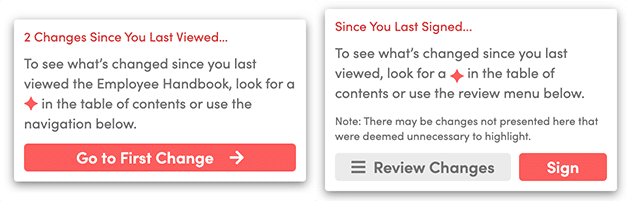
When you update a state-specific addendum, only the employees in that state need to know. Blissbook’s annotations guide employees through the changes that happened since the last time they viewed or signed the handbook. You control what they see, and the rest of your workforce doesn’t get an unnecessary notification.
That specificity matters. An HR coordinator maintaining seven versions of the same handbook for seven states can spend more time distributing updates than writing them. Targeting updates to the right people, automatically, is what turns compliance from a fire drill into a rhythm.
Tracking Multi-State Sign-Offs and Building an Audit Trail
When someone asks whether employees saw the new California meal break policy, you want a better answer than “we sent an email.”
An audit trail for a multi-state handbook needs to track three things per employee:
Which version of which policies (including state-specific addendums) each employee viewed
When they acknowledged each version
Whether they were shown the correct content for their location at the time of acknowledgement
Paper-based or spreadsheet-based tracking can’t reliably do this across five states, much less fifty. The risk isn’t abstract: in a wage and hour audit, the question “did this employee receive notice of their rights under California law?” requires a concrete, time-stamped answer.
Different combinations of personalized content can add up to hundreds of policy variants. Blissbook’s reporting records the exact variant each employee saw, when they signed, and which version was current at the time.
Custom Signature Rounds for State-Level Changes
When you update California-only policies, you don’t need every employee across all states to re-sign. You can start a new signature round for only the employees affected by the change. This keeps your acknowledgement rates meaningful: 100% of your California team signed the updated California policies, and your other employees didn’t get a confusing request to sign something that doesn’t apply to them.
Want to see what that report looks like for your states? Request a Demo
Keeping Your Multi-State Handbook Current
Employment law changes constantly at the federal, state, and local level. The operational challenge isn’t knowing a law changed. It’s acting on it before your handbook falls out of step.
A review process for multi-state handbooks needs three components:
A watch list of the states where you have employees and the policy areas most likely to change in each
An owner for each state addendum who’s responsible for reviewing changes
A cadence (quarterly is common, though states with heavy legislative activity like California may need more frequent reviews)
Blissbook’s Law Change Alerts track changes in federal, state, county, and city laws that may require handbook policy updates.
You can go a step further with the Labor Law Change Updates service, where Blissbook suggests edits to your policies as laws change. All you need to do is review and approve the proposed updates.
That’s the difference between a compliance process that depends on someone remembering to check and one that brings the changes to you.
What to Look for in Employee Handbook Software for Multi-State Compliance
Not every handbook tool handles multi-state complexity. When you’re evaluating employee handbook software for a workforce spread across multiple states, these are the capabilities that matter:
Personalized Content by Location, Entity, and Group
Employees should see only the policies that apply to them. This eliminates the “wrong state” problem and reduces confusion. Look for tools that let you control visibility at the section or policy level, not just the document level.
Version Control with a Full Audit Trail
Every policy change should be tracked: what changed, who published it, when it went live, and who acknowledged it. Version history that shows exact content diffs between versions matters more than a simple “last updated” timestamp.
Targeted Acknowledgements and Signature Tracking
You need the ability to run signature rounds for specific audiences (all California employees, for example) without triggering a notification for everyone else. The reporting should show exactly which policies each employee signed and which version was current at the time.
HRIS Integration for Automated Employee Data
When a new hire starts in a state you already cover, their employee record should automatically determine which policies they see. HRIS integrations (Blissbook connects with 80+ HRIS, payroll, and directory platforms) eliminate the manual step of assigning employees to the right state addendum.
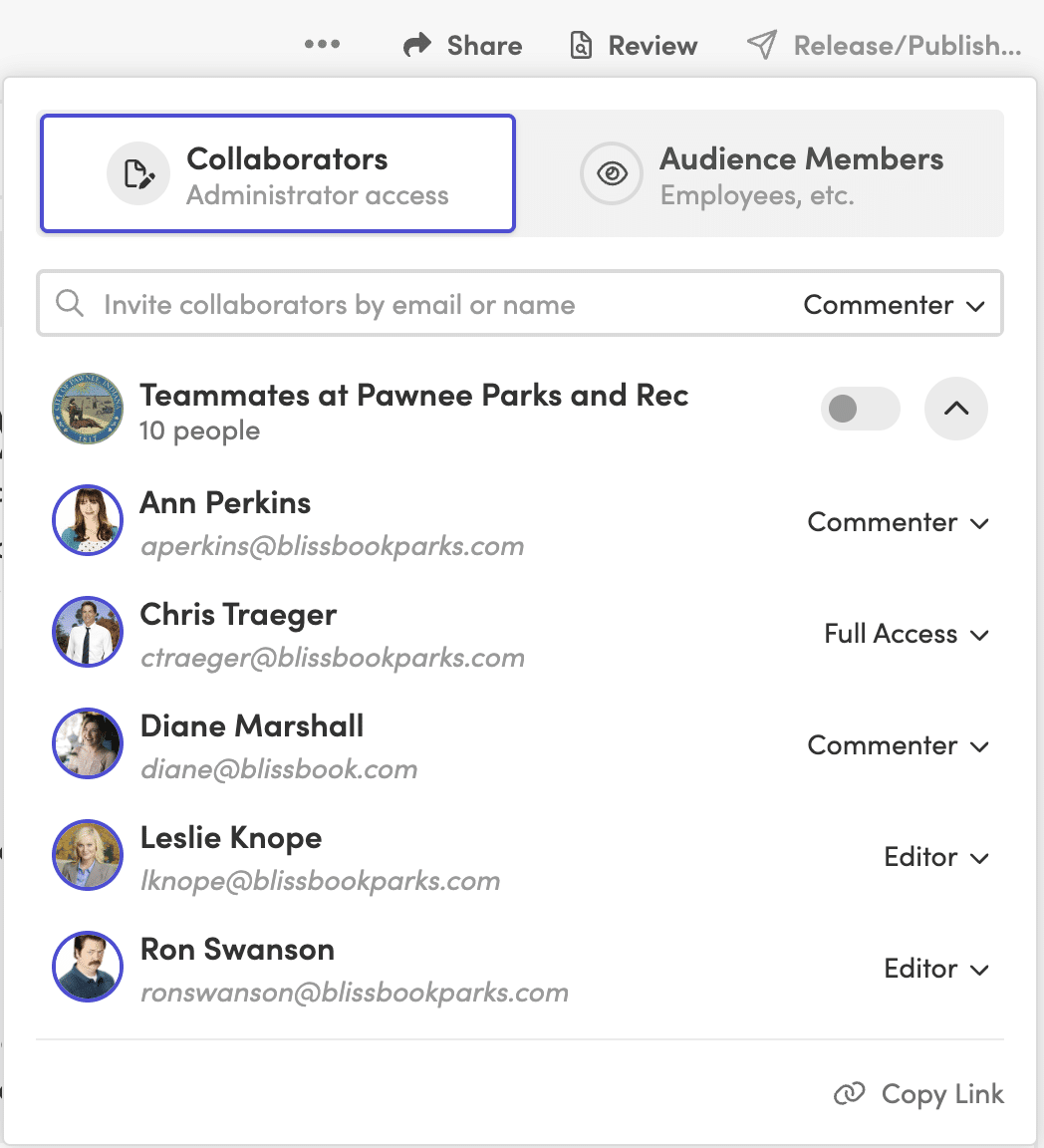
Collaborative Editing and Approval Workflows
State addendums often need legal review before publishing. Built-in approval workflows that route updates for review and create a clear audit trail from draft to final reduce the risk of an unapproved policy going live.
Remote Employees and Multi-State Handbook Complications
Remote work multiplied the multi-state problem. One remote hire in a new state can trigger payroll registration, unemployment insurance, and workers’ compensation obligations that your existing handbook doesn’t address.
Your handbook should include a remote work policy that specifies which state’s laws apply to remote employees, particularly for expense reimbursement (California requires reimbursement for necessary work expenses, and that rule follows the employee regardless of where the company is headquartered).
The tricky part: an employee who moves to a new state without telling you can trigger compliance obligations you don’t know about.
Your handbook needs a clear policy requiring employees to notify HR of any change in work location. And your employee handbook software needs to let you reassign that employee’s content instantly when they do.
Common Mistakes in Multi-State Handbook Management
Sounds obvious, but these come up repeatedly:
Applying a “highest standard” approach to every policy without analyzing cost impact. Meal break rules and paid leave mandates can get expensive when applied across states that don’t require them.
Treating at-will language as universal. Several states limit at-will employment in ways your standard disclaimer doesn’t cover (Montana, for example, requires “good cause” for termination after a probationary period).
Failing to update addendums when entering a new state. One new hire in a new state means a new addendum is needed before that employee starts.
Sending every employee every policy update, regardless of whether it applies to them. This trains employees to ignore handbook communications.
Relying on email attachments or shared drives for distribution. When audit time comes, you need time-stamped proof of exactly which version each employee received and acknowledged.
Sound familiar? Talk to us and we’ll show you how other multi-state teams handle it.
A Multi-State Handbook Is a System
Your handbook has to keep up as your team crosses state lines, as legislatures pass new laws, and as employees move.
The structure stays the same: one core handbook, state-specific addendums for the policies that vary, personalized delivery so employees see only what applies to them, and acknowledgement tracking that holds up to scrutiny.
Blissbook gives you the pieces to run it: personalized content, targeted signature rounds, audit-ready reporting, and Law Change Alerts.
FAQs About Employee Handbook Software for Multi-State HR
Do I need a separate employee handbook for every state?
No. A single core handbook with state-specific addendums is the most practical approach for employers in five or more states. Blissbook’s personalized content features let you keep everything in one handbook while each employee sees only the policies relevant to their state.
What state laws cause the most multi-state handbook conflicts?
PTO payout requirements, paid sick and family leave mandates, meal and rest break rules, and final paycheck timing are the most common sources of conflict. California, New York, and Illinois impose requirements that frequently differ from federal baselines and from each other.
How do I track which employees signed which state-specific policies?
Blissbook automatically tracks the exact content each employee viewed when they signed their acknowledgement. Reporting shows which version of which policies (including state addendums) each employee signed, creating an audit trail that answers the question “did this employee receive notice of their rights?”
Can I send policy updates to only the employees in a specific state?
Yes. Blissbook lets you start a new signature round for only the employees affected by a state-specific change. Your California team signs the updated California policies, and employees in other states aren’t sent an unnecessary notification about a change that doesn’t apply to them.
What happens when a remote employee moves to a new state?
A remote employee who relocates can trigger new compliance obligations including payroll registration, unemployment insurance, and updated handbook policies. Your handbook should require employees to notify HR of location changes. With Blissbook’s HRIS integrations, you can reassign that employee to the correct state addendums as soon as their record updates.
How often should I review my multi-state handbook?
A quarterly review cycle works for most organizations, with more frequent checks for states with heavy legislative activity like California. Blissbook’s Law Change Alerts notify you of federal, state, county, and city law changes that may require handbook updates, so you’re not relying on someone remembering to check.